Ink Tasks
A Handwritten To-Do List App That Moves With You
Write your next task with a stylus. Reorder your list as priorities change, group tasks with labels, and check them off in your own handwriting workflow.

Google Play

Microsoft Store
App Store
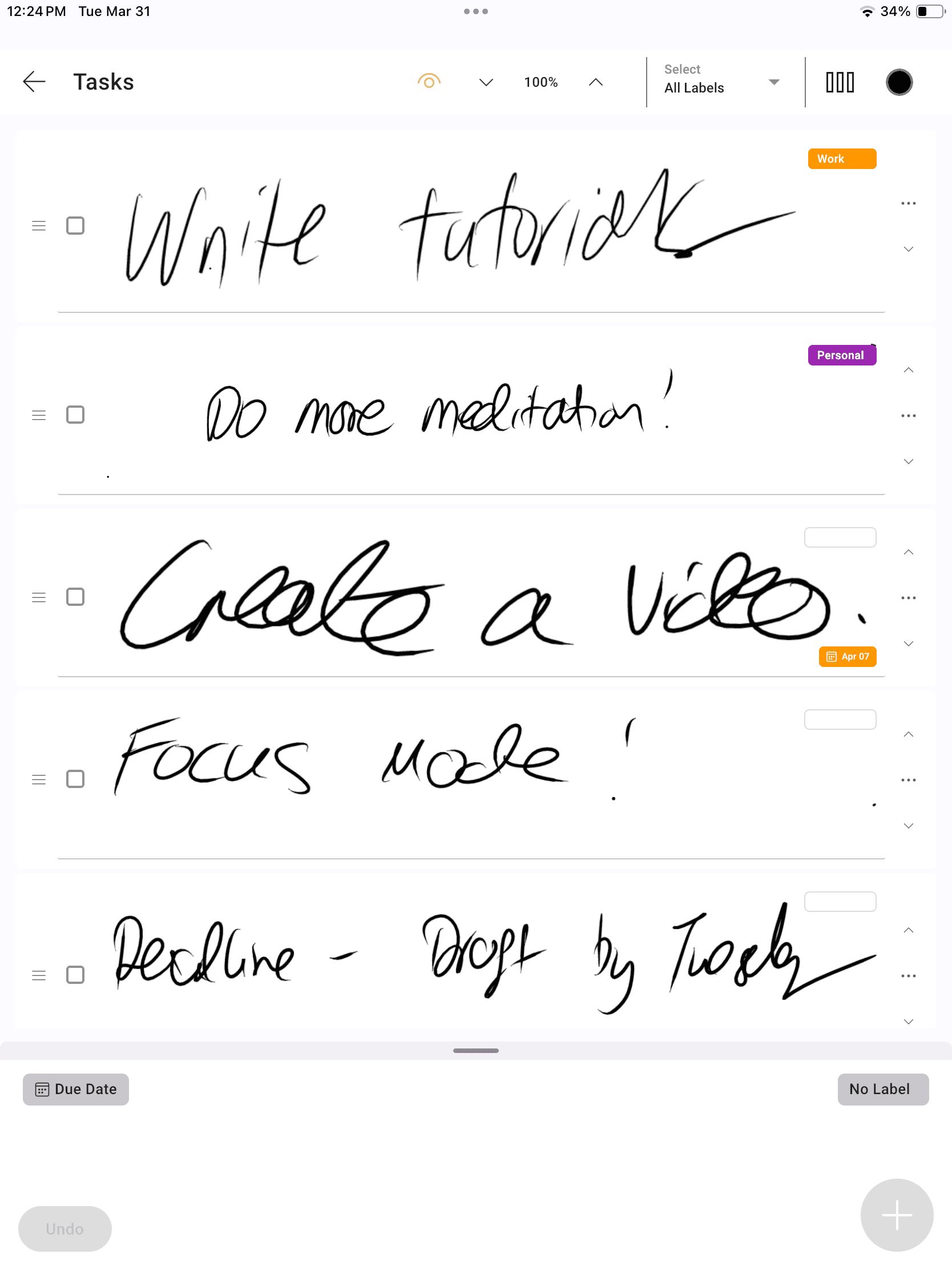
Your handwriting, organised into a real task list. Due dates shown are a Pro feature.
The Feel of a Paper List. Room to Reorganise.
InkThink gives each handwritten task its own place in a scrollable list. Your words stay in ink, while task controls help you organise the work around them.
Write a task
Capture a quick to-do with your pen, without turning the thought into typed text.
Reorder your priorities
Move tasks up or down your handwritten list as your plans change.
Give work a label
Create and assign task labels, then filter your list to focus on a project or part of your life.
One Handwritten Task List, Many Kinds of Day
From small errands to the next project milestone, keep the action visible without rewriting the whole list.
A daily shortlist
Write the things you want to finish today. Reorder them so the next useful action is easy to find.
Project next steps
Give related tasks a project label. Filter to that label when it is time to focus on one piece of work.
Work and personal lists
Use labels such as Work and Personal to organise errands, creative ideas and commitments in the same app.
A to-do list with Apple Pencil
Handwrite on iPad with Apple Pencil, or use a compatible pen on Android and Windows devices.
Google Play
Microsoft Store
App Store
From a Thought to a Finished Task
01
Capture it
Add a handwritten task from Quick Entry or your task list.
02
Organise it
Assign a label and reorder the list to match your priorities.
03
Check it off
Use the task checkbox when the work is done, then move to the next item.
Start with Ink. Add Scheduling with Pro.
The handwritten task list is part of Base. Pro adds ways to put dates and a wider planning view around your work.
Base: write, reorder, label
Keep a scrollable handwritten list, rearrange tasks, and use labels to organise and filter them. Work offline and sync across devices.
Pro: dates and visual planning
Set task due dates, see dated tasks on your calendar, and view tasks in Kanban columns and Priority Matrix, based on a label you choose.
Handwritten To-Do List App FAQ
Is this a real handwritten task list?
Yes. You write the task with a stylus. InkThink keeps that handwriting in a task item with a checkbox and controls for organising the list. It's a very unique app unlike anything else.
Can I rearrange tasks without rewriting them?
Yes. The task list is reorderable, so you can change the order as priorities shift. Labels let you organise and filter tasks too.
Can I use Apple Pencil for my to-do list?
Yes. InkThink supports iPad with Apple Pencil, along with compatible Android and Windows pen devices. See the Devices page for supported hardware.
Does the handwriting task app work offline?
Yes. You can work with tasks offline and keep data locally. An internet connection is needed for purchase and cross-device sync.
Are due dates included in Base?
Due dates, tasks on the calendar and label-based Kanban are Pro features. The core handwritten list, reordering and task labels are Base features. See Pricing for current options.
