Ink Canvas
Mind Mapping with Handwriting, in Your Own Way
Write an idea, place another beside it, and explore how they connect. InkThink gives you a visual canvas for thinking with your pen and arranging your own thoughts.

Google Play

Microsoft Store
App Store
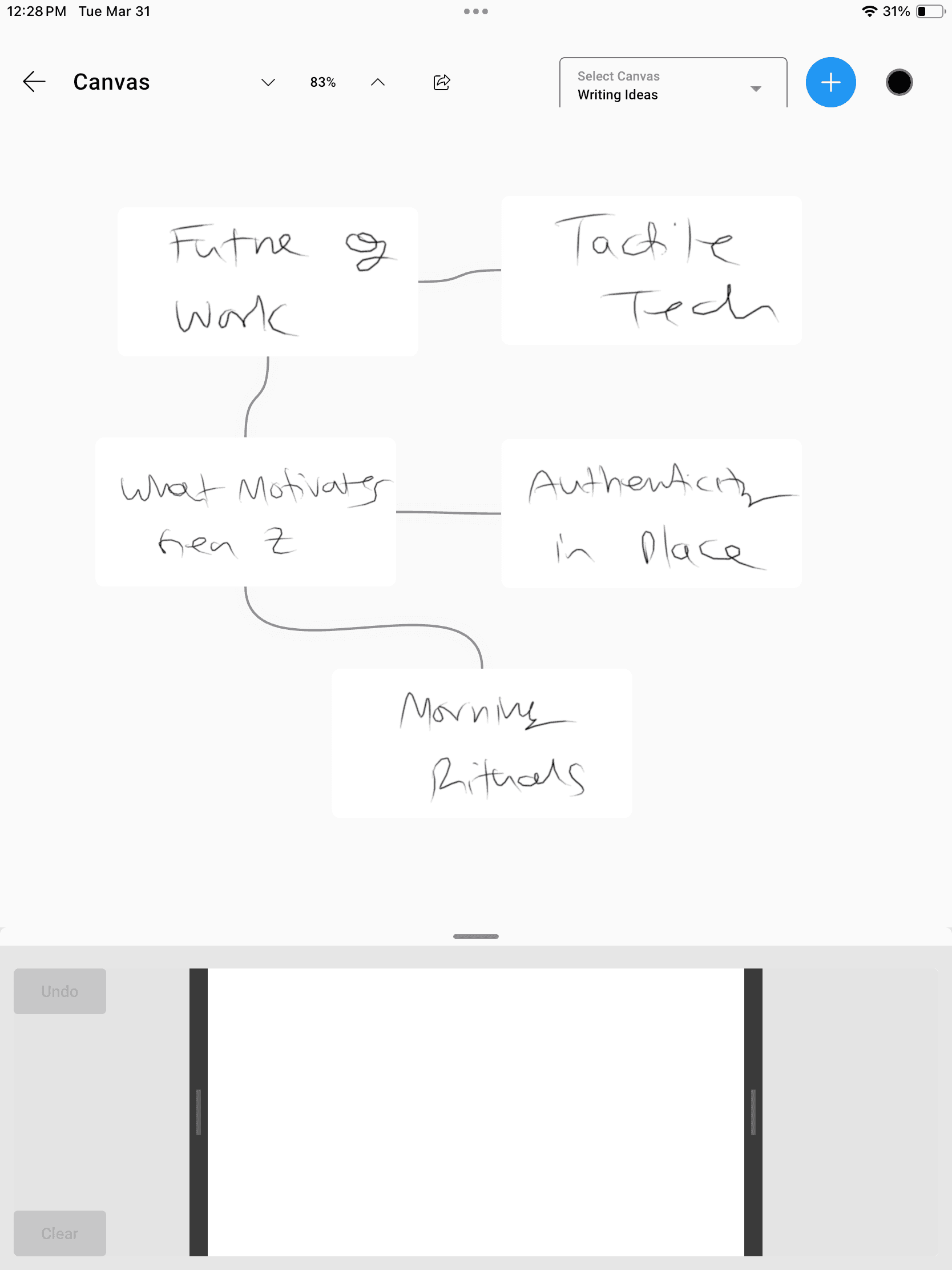
A real InkThink canvas: handwritten ideas arranged and connected by the person thinking them through.
A Handwriting Mind Mapping App for Your Ideas
Ink Canvas is a whiteboard and mind-map space where handwritten ideas can be arranged freely, like index cards on a corkboard. You create the content and decide the connections.
Think with your pen
Capture a phrase, a question or a rough thought in your own handwriting.
Arrange ideas freely
Move handwritten ideas around the canvas to explore groupings and relationships.
Make connections
Draw out relationships between your ideas and shape a map that makes sense to you.
A Visual Brainstorming App for Open Questions
Start before you have a tidy outline. Use the space to explore possibilities and find a useful direction.
Plan a piece of writing
Put possible themes on the canvas. Arrange supporting ideas around them until a direction begins to emerge.
Explore a project
Lay out questions, constraints and possibilities. Move related ideas together as you think through the work.
Connect what you learn
Write key concepts in your own words and draw the relationships you notice between them.
Brainstorm with a stylus
Use Apple Pencil or a compatible Android or Windows pen to get ideas out of your head and into a visual space.
Google Play
Microsoft Store
App Store
From a Loose Thought to a Handwritten Mind Map
01
Start with an idea
Write a topic or question on your canvas with a stylus.
02
Add and arrange
Capture related thoughts and move them into a useful arrangement.
03
Draw connections
Show how your ideas relate, then revisit the arrangement as your thinking develops.
Your Handwriting. Your Connections.
The value is in doing the thinking yourself. Ink Canvas gives your handwritten ideas space to develop.
Write and arrange by hand
Create your own handwritten mind maps and visual groupings. Canvas is included in Base and works offline.
Share the picture with Pro
Pro lets you share mind maps as images to other apps, so someone else can see the thinking you have put on the canvas.
Handwriting Mind Mapping FAQ
Can I make a mind map with a stylus?
Yes. Write your ideas on Ink Canvas, arrange them freely and draw connections. It is a way to build a handwritten mind map using your own pen input.
Does InkThink generate the map with AI?
No. You write the ideas and choose how they are arranged. The handwriting comes from your stylus, not an AI-generated map or a handwriting font. While we may include AI in the future our goal is to make this primarily a thinking app for your mind.
Can I use Apple Pencil?
Yes. You can use iPad with Apple Pencil, or compatible pen hardware on Android and Windows. See Devices for supported hardware.
Can I brainstorm offline?
Yes. InkThink works offline with data saved locally. Purchase and cross-device sync need an internet connection.
Can I share a handwritten mind map?
With Pro, you can share your mind map as an image to email, messaging or other apps. Creating and arranging ideas in Canvas is included in Base.
