Your Planner Should Have Three Zooms — Not Three Apps
I was running three planners for years and never once called it a system. The fix is not another app — it is one planner that holds a day, a week, and a month of the same ink, and remembers which one you actually start from.
I run three planners. I hate that I run three planners, but I do. A wall monthly for the big picture. A weekly spread for the actual work. A daily scratchpad for today. Same appointments, three shapes, three places to look when something slipped.
I did not realize how expensive that was until I watched Amanda from Amanda’s Favorites open a planner video with a question no planner app has ever asked me: are you a daily, weekly, or monthly planner? Her own answer is monthly, and she still runs all three. Her point is that everyone reads time from a slightly different distance, and the distance your brain defaults to is the one that decides how you plan. That reframed the whole problem for me. My planner problem was never the layout I picked. It was that I picked three layouts and called it a system.
The three-planner tax
Every additional planner is a second place your brain has to check. That sounds like a small thing. It is not. Three planners means three kinds of tax, and they compound.
Duplication. The same appointment gets written three times. Once on the month, once on the week, once on the day. Now you have three copies that can disagree with each other.
Context switching. Before you can even look at the right information, you have to decide which planner to open. A small decision, made tired, before coffee, every single day.
Drift. The weekly says one thing and the month says another, and you trust whichever one you happened to see last. That is not a system. That is a rumour.
There is a fourth cost that only shows up over time. If you are a daily planner, you need every hour laid out in front of you, and that is genuinely useful on a Tuesday. It is also the reason that by Wednesday you have forgotten what you committed to on Monday. The daily view is superb at today and completely blind past Thursday. A monthly planner has the opposite problem. You can see the whole month, the birthdays, the anniversaries, the big deadlines, the travel — and the individual days blur into a grid of shapes you have not filled in yet.
Both are useful. Neither is enough. And the thing nobody tells you is that you were never going to fix this by choosing the right one.
There is one anchor, and it is not the same for everyone
The useful part of Amanda’s framework is not the three categories. It is the question underneath them: which zoom does your brain default to? That default is your anchor. It is the view you build everything else around.
Anchor | What you need to see | What it quietly costs you |
Daily | Every hour, every task, laid out | By Wednesday, Monday is already gone |
Weekly | The whole week as one unit you can hold | Sunday night becomes your entire planning ritual |
Monthly | The whole month at a glance | The days blur and execution quietly slips |
If you think in weeks, you plan on Sunday and live in the week. If you think in months, you plan quarterly and work backwards, and the days are somebody else’s problem until they are not. Most people are a hybrid of two or three. Almost nobody is only one.
Here is the part that matters: hybrid does not mean you use three apps. It means you have one anchor that is always visible, and the other zooms are scratch space rather than the system of record. You are not supposed to maintain three systems. You are supposed to have one system and two windows onto it.
What the paper stack gets right, and where it breaks
Amanda’s own setup is worth describing, because it is better than most of the digital systems I have used. Her monthly sits up on an acrylic easel at desk eye-level, so the big picture stays in her peripheral vision while she works the week. The weekly is the planning view, filled in on Sunday. The daily is a scratchpad she opens only when she needs it.
Look at the hierarchy. The anchor is furniture. The other two are tools. And the part that is easy to miss: nothing is retyped. The month is not a summary of the week. It is a different zoom on the same week. That is the whole trick, and paper gives it to you for free because your eye can rest on the whole page while your hand writes on one square of it.
Digital planners usually throw this away, and they throw it away in one of three predictable ways.
One app per zoom. A week-view app, a month-view app, and a to-do app, each with its own account, its own sync, and its own idea of what a task is. The duplication returns, and now you are typing instead of writing.
The zoom is a separate document. Each view is its own page you write on. Move an event from the month to the week and you re-enter it. Nothing reflows, so the views slowly disagree, and you go back to trusting the one in front of you.
The list kills the handwriting. Paper worked partly because writing by hand is slower, which is exactly why you think. Replace the day with a checkbox list and you have traded the friction that made paper good for the friction that made paper tedious.
Those three failures are why I kept ending up back in paper, and also why I kept ending up back in a stack of apps. The stack of apps at least let me write.
One set of ink, three zooms
Here is what I wanted the whole time and did not have: a planner where the zoom is a view, not a document. Where what I write in the month is the same ink I see in the week, because it is the same entry. Not a copy. Not a summary. The same thing, seen from a different distance.
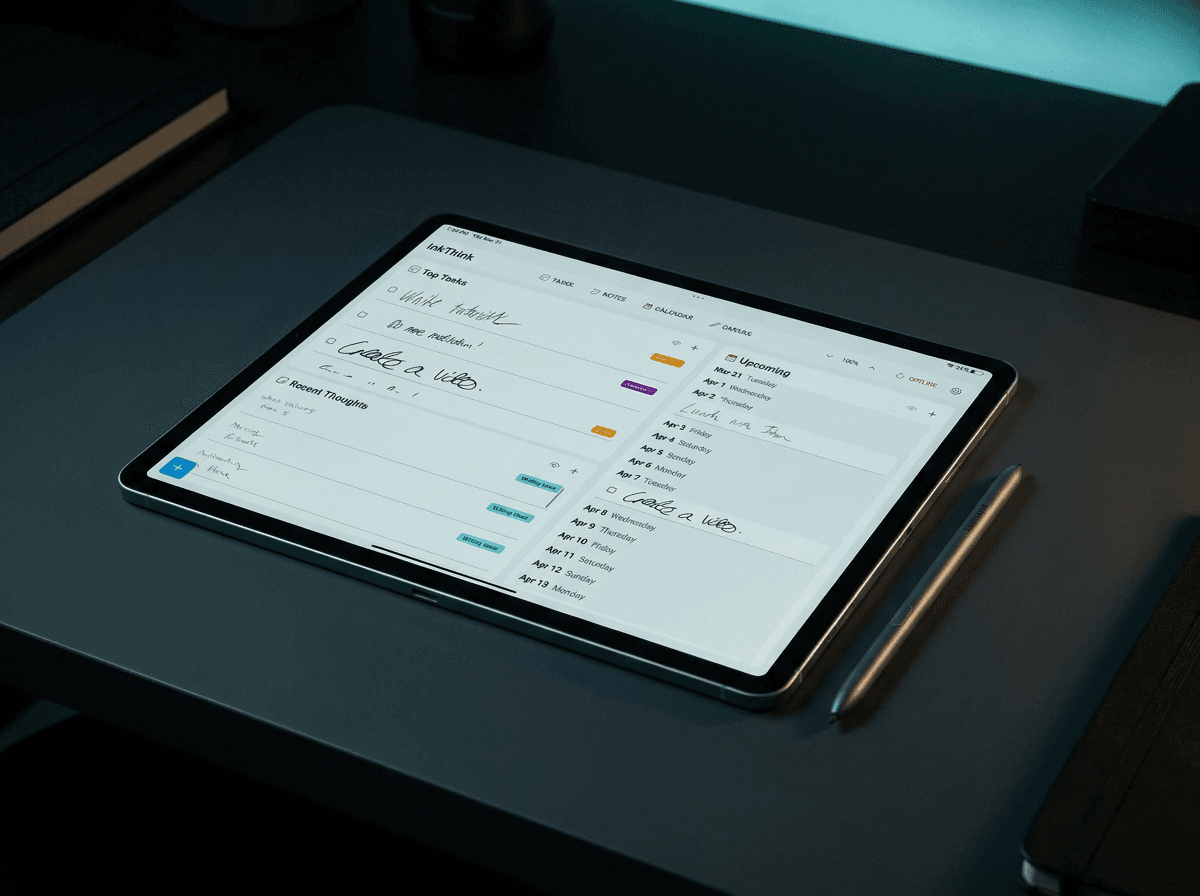
InkThink does that with reflow. Write dentist, 3pm once, in ink, and it lives in the month, shows up in the week, and lands in the day. Nothing is retyped. Nothing drifts, because there is only one version of the truth. The month view is not a picture of your week. It is your week, further out.
Map that back to Amanda’s stack and the three-planner problem dissolves. Your anchor becomes the view the app opens on, and InkThink can learn it, so the month lands in front of you every morning if that is your zoom. The week stays live and reflows itself as things move. The day is scratch space — the thing you scribble in without it becoming the system of record.
And because it is all ink, your handwriting survives the zoom. You write the month in your own hand. That same hand is what you see in the week. Nothing downgrades to a checkbox between the anchor and the scratchpad.
Her stack, rebuilt in InkThink
I want to be precise about this, because “just use an app that does all three” is exactly the kind of sentence that sounds good and does nothing. The stack has to keep its structure. Amanda’s has four parts: an anchor that is always visible, a planning view filled on a schedule, a scratch space you open only when needed, and — the part people skip — a rule about which one is the system of record.
InkThink maps onto it more directly than I expected. The tabs are the views. Your anchor becomes the view the app opens on, so if your zoom is the month, the month is what greets you every time, not something you go looking for. The week is the planning view, and it reflows itself as things move rather than needing you to redraw it on Sunday night. The day stays a scratchpad. And because every view reads from the same ink, none of them is the system of record — all of them are the same system, seen from three distances.
That last point is the one that actually fixed it for me. I used to think a planner had one home and two satellites. It does not. It has one truth and several distances from it. InkThink also gives you the zoom levels above those three when you need them — a three-day view for a packed week, two- and three-month views when the month is not far enough out — which is how you handle the people who genuinely do not think in months without pretending they do.
The zoom test
You do not need a personality quiz. You need to know which view your hand reaches for. Ask yourself these five, and pay attention to the pattern rather than any single answer.
When somebody asks how your week looks, which view do you picture first?
When you plan on Sunday, are you filling in the week or filling in the days?
When you realise something is off in three weeks, where do you look first?
When you miss a commitment, which view had it written down?
What did you write this morning that you still want to see this evening?
Most people cluster hard. If you picture the month when someone says week, you are a monthly planner who uses a week. If you cannot hold a week in your head, you are a daily planner, and you should stop pretending otherwise.
One honest warning. You will probably discover you want more than one. That is normal and it is fine. The point is not to have one zoom. The point is to know which one is the anchor, so the other two are windows instead of systems.
Build the stack, do not collect the tools
Once you know your anchor, the build order is short.
Make the anchor your default screen. If you are a monthly planner, you should be able to pick the device up and see the month before anything else. If you are a weekly planner, the week should be what greets you. The anchor should be the first thing, not the thing you have to go looking for.
Let the other zooms be views of the same ink. Not pages. Not separate files. Views. If moving an event between the week and the month means retyping it, the stack has already broken.
Never re-enter an event. This one rule catches most of the duplication. If it exists once, it belongs to all three zooms, and it should cost you exactly one entry.
Keep the day as scratch space. A daily view you have to maintain is a daily view you will stop maintaining by the third week. Let it be a place you think, not a place you file.
That last one is the one I got wrong for years. I treated the day as the real planner and the month as decoration. It is the reverse for me now. The month is where I look. The day is where I dump.
The thing paper was actually doing
I think there is a bigger lesson hiding in Amanda’s easel than anybody realises.
The advantage of a monthly page is not that it is paper. It is that your eye can rest on the whole month while your hand writes on one square of it.
That is a spatial advantage, not a material one. Ink on paper gives it to you for free. Screen-based planning tools throw it away by default, because most of them make you pick one screen and commit to it. Choose your screen, commit, and the month goes dark for the rest of the week — which is precisely the failure mode that made me buy a second planner, then a third.
So the tool that wins is not the one with the prettiest layouts. It is the one that keeps all three zooms in the same place, at the same time, on the same ink. That is the thing paper does that a stack of apps cannot. It is also the thing a tablet with a stylus can do properly, once the views reflow instead of competing.
InkThink is built around exactly that: day, week, and month over one set of ink, with handwriting first and checklists second. It is a one-time purchase, not a subscription. If you have ever bought a second planner to fix the one you already had, you are the target user.
NoteDex thinks, InkThink acts. Same team, different job. If the thinking side of your life lives in one app and the doing side should live in another, that is the split we built both halves of.
Questions I get about this
Q: Is a weekly planner better than a daily one? No. It depends on what your brain does when it is tired. A weekly planner who tries to run a daily view ends up maintaining a daily view they never read. A daily planner who runs a weekly view ends up with a week they never look at. Pick the one you will actually open.
Q: Does InkThink replace a paper planner entirely? For a lot of people, yes. It has day, week, and month views over the same ink, so the anchor stays visible while you work in the others. If you still like paper for the month, keep it. That is a reasonable choice — just do not also buy a second digital planner.
Q: What if I do not know my anchor yet? Then use the test above for two weeks and watch where your hand goes. Do not buy anything in the meantime. The anchor is a habit, not a personality, and it is easier to notice than to guess.
Q: Why not just use a good notes app and draw my own calendar? You can, and some people love it. The problem is that you then maintain three calendars yourself, by hand, forever, with no reflow. If you want to draw your own, use one that reflows the same entries across your views instead of asking you to redraw them.
Q: Is a monthly planner not just for big-picture people? It is for people who lose money on the big picture. If you are the one who forgets the deadline until the week it lands, you need the month visible. The day will still be there when you get to it.
Q: Do I need all three views set up before I start? No. Start with your anchor. Add the other two when you feel the pull. A planner with one good view beats a planner with three empty ones.
Q: What about people who plan quarterly or yearly? Same principle, larger distance. Whatever the zoom is where you do your thinking, that is your anchor, and that is the view that should stay in front of you. The rest are windows onto it.
Q: How do I stop the three-planner drift from starting again? One entry, one version, one place. The moment you catch yourself typing the same event a second time, that is the signal you have started a second system. Delete one of them.
— Prem, Creator of InkThink