Your Monthly Calendar Is More Powerful Than You Think
Most people use their monthly view for appointments. It can do four other jobs — capacity awareness, project movement, reality tracking, memory keeping — and once you see all four, you cannot go back.

I used to think a monthly calendar was a list of things I had to be somewhere for. Appointments, birthdays, the occasional dentist visit. Anything beyond that felt like a waste of a perfectly good grid. Then I watched a planner walk through four different monthly layouts in four different notebooks, each one doing a completely different job, and the calendar I thought I knew quietly broke open.
The thing she was actually doing was not "using a calendar." It was using the calendar as a planning tool — a place to look at the month before the month starts, see where the energy is already spoken for, and decide what is realistic to add. The monthly view was not the destination. It was the testing ground.
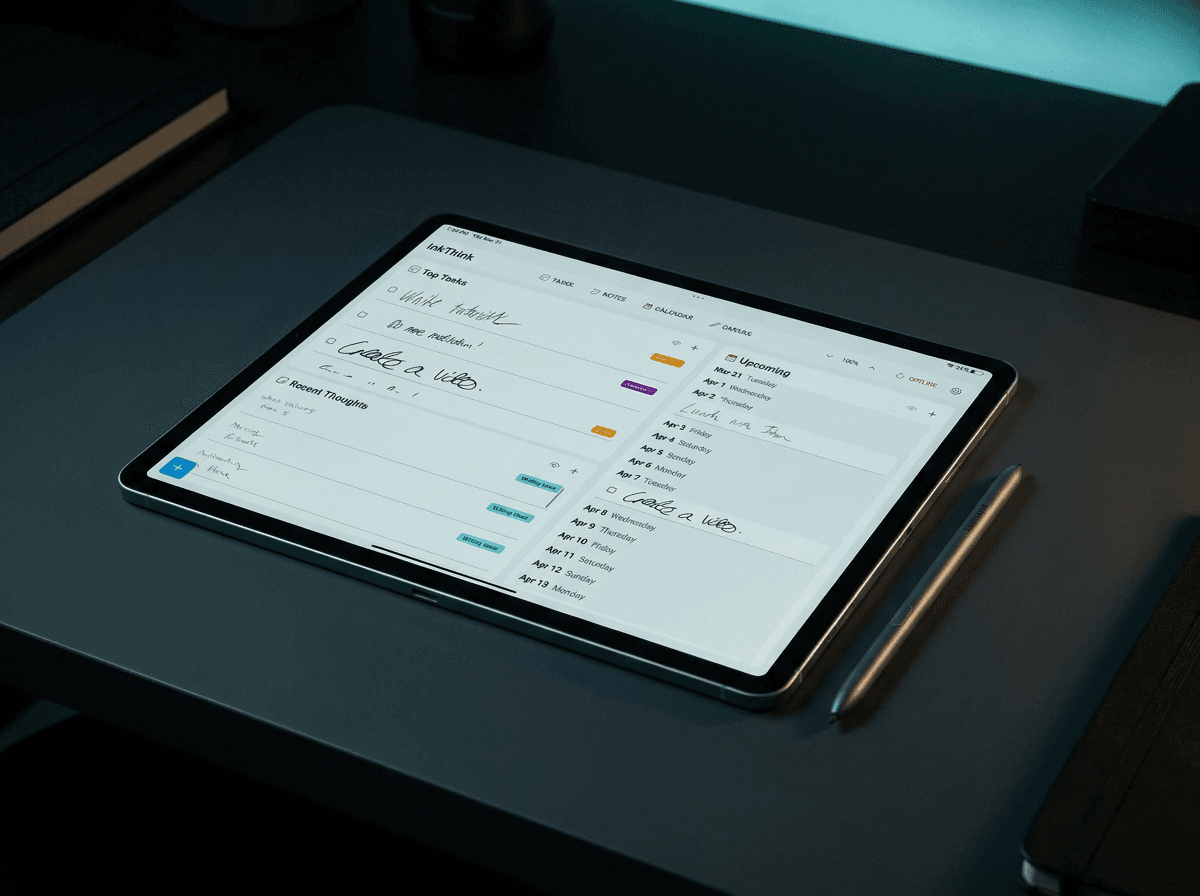
That framing is the entire reason InkThink exists. We did not build a digital planner because paper is bad. We built it because the planning you actually do — the staring at a month and asking "is any of this even possible" — should not require four notebooks and a stack of sticky notes to do well. So this post is for everyone whose monthly view is still a glorified appointment book. It can be a lot more. And once you see it, you cannot unsee it.
1. The "command center" monthly: a place to see the whole month before it starts
The first use of a monthly calendar that changes everything is the awareness one. Before you plan a single week, you look at the month and ask: what kind of month am I walking into? Which weeks are already heavy? Where do I realistically have flexibility? What days feel full before they even begin?
Most people skip this step. They go straight to the week. They go straight to today. They are already in it before they have any idea what they are in.
A monthly view that is set up to answer "what is this month" is doing something the weekly view cannot. The week is too zoomed in. It treats Monday the same as Wednesday. It hides the fact that week two has a launch, week three has travel, and week four is the calm before the storm. A month is the smallest unit of time where those patterns are still visible.
In InkThink, this is what the Monthly spread is for. It is a single page that puts the entire month in front of you, with enough room to mark the heavy weeks, the quiet weeks, and the commitments that are not negotiable. It is not a place to schedule meetings. It is a place to schedule reality.
This is the flexible planning and thinking that makes the whole approach work. One entry, reflowed across day, week, and month, across as many views as the work actually needs.
2. The project monthly: a different layout, a different job
The second use is the one most people never get to. Once you have a calendar that handles the whole-month view, you realize you also need a different kind of monthly view for project work. Not appointments. Movement. A place to look at the month and ask: where is this project actually going to land, and what would have to be true for it to land there?
This is the alternate or undated monthly. It is not anchored to a specific month. It is anchored to a project. While you can sketch the project across thirty days in a different ink color on your calendar, the Canvas view will be better here - using the canvas view to lay out a series of undated Cards for a month view. You move things around when reality shifts, and you let the project breathe. The Canvas is good in that it is an undated map. Projects do not respect the calendar's opinion about what month they should land in.
Most paper planners cannot give you a different layout without buying a second notebook. InkThink gives you as many canvases as you want, switchable with a tap. The project monthly can live in your Calendar if you like, but perhaps the Canvas is better since you can refer to it as a planning guide. Using Calendar can be better for seeing a month view more structure, using Canvas allows for more of a 'template' you can use independently. See what works for you but as you can see InkThink offers many planning options.
3. The reality-log monthly: writing down what actually happened
The third use is the one that tends to change people's minds the most. A monthly calendar is not only for what you plan. It is for what actually happens.
In a work planner, this looks like: plan the day in the daily section below the monthly grid, then at the end of the day, write a one-line note in the monthly square about what really got done. Not what was supposed to get done. What actually got done. The meeting that ran long. The unexpected task. The thing you thought would take an hour and took the whole afternoon.
This sounds small. It is not. After a month of doing this, you have an honest map of where your time actually went, which is the only data that matters for planning the next month. The plan is fiction. The reality log is the source of truth.
A lot of people only account for visible output when they plan. They forget that thinking is work. Reviewing someone else's work is work. Strategizing, mentoring, moving pieces — that is all work, and it almost never makes it onto the calendar. A reality log forces it into view. Once you can see the invisible work, you can plan for it, push back on it, or stop pretending it does not exist.
In InkThink, this is the kind of thing the planner supports by being low-friction to update. You do not have to retype anything. You do not have to copy from your week into your month. The same entry that lives on Tuesday in the daily view can be annotated at the monthly level with a single tap. The calendar learns what your month actually looked like, not just what you hoped it would look like. Use a different ink color to really make it stand out - mark with red or green for a quick visual view!
4. The memory-keeping monthly: one sentence a day, then close the book
The fourth use has nothing to do with productivity, and it is the one most people resist until they try it. A monthly calendar can be a place to write down one thing that happened that you want to remember. Not a journal entry. Not a paragraph. One sentence. The funny thing your kid said. A small observation. A tiny moment. An emoji sticker if that is more honest than words.
Years from now, you will not remember what meeting you had on a random Tuesday. You will remember the weird dream your partner described at breakfast, the name of the barista who finally learned your order, the fact that it rained for nine days straight in February and you read an entire novel in the process.
A monthly view is the perfect canvas for this. It is high-level enough to stay low-effort. You are not committing to a daily journal. You are committing to one sentence per square, thirty sentences a month, three hundred and sixty-five a year. At the end of the year, that monthly grid is a year of your life in one place, scannable, glanceable, and you did not have to write more than a single line on any given day.
A planner that supports memory keeping is a planner that reminds you that planning is not only about managing time. It is about paying attention to your life while you are living it.
5. Why a single monthly layout is leaving 75% of the value on the table
If you only use your monthly view for appointments, you are using maybe one quarter of what a monthly grid can do. The other three quarters are:
Capacity awareness — see the heavy weeks and quiet weeks before you commit to anything.
Project movement — visualize how a project is actually going to land across the month, separate from your real-life calendar.
Reality tracking — log what actually happened, not what you planned, so next month is more honest than this one.
Memory keeping — write one sentence a day in the monthly square, no journal required.
Four jobs. Four kinds of monthly view. None of them replace each other. They are complementary lenses on the same thirty days, and the planner who has access to all four plans a fundamentally different month than the planner who only has one.
In paper, this means buying more notebooks. In InkThink, it means tapping a button. Same canvas, more views, no extra hardware.
6. The shift that unlocks all of it
The shift is not "use more layouts." The shift is letting the monthly calendar be more than one thing.
Most people treat their monthly view as a fixed thing: a grid in the front of a planner, mostly empty, occasionally holding a birthday. The reframing is that the monthly view is a category, not a single page. You can have as many of them as the work and life actually need. One for awareness. One for projects. One for reality. One for memory. All of them on the same canvas, all of them talking to each other, all of them updated by the same set of daily entries flowing upward.
That is what InkThink is for. The whole point of the app is that one entry, written once in the daily view, reflows across the day, the week, the month, and the project — wherever it needs to be visible — without you re-writing it. The planning you do today shows up in the monthly view of next week without any extra effort. The project you started in February is still visible in the monthly view of July because it is still in flight, not because you copied it forward.
That is the multi-view thinking the original four-notebook planner was reaching for with sticky notes and a stack of undated inserts. InkThink does the same thing in software, and it does it without you having to re-write anything when reality shifts.
Try it for one month
If you have been treating your monthly view as an appointment book, try this for a single month. Pick one of the four uses — capacity, project, reality, or memory — and use the monthly grid for that, in addition to whatever you already do. Do not change the rest of your system. Just add one new job to the monthly view.
By the end of the month, you will know what the monthly grid is actually for. And you will not want to go back to a calendar that only does one of the four.
If you want a planner that supports all four without buying four notebooks, that is what InkThink was built for. The monthly view is not a page. It is a category. And you can have as many of them as the month actually needs.
— Prem, Creator of InkThink
FAQ
What is the best way to use a monthly calendar for productivity?
The most powerful single use of a monthly calendar is capacity awareness — looking at the whole month before it starts and seeing which weeks are heavy, which are quiet, and which are already spoken for. Most people skip this step and go straight to the weekly or daily view, which is why their plans feel unrealistic. The monthly view is the smallest unit of time where the shape of your real life is still visible.
Should I use one monthly calendar or several?
If you can, use several. The four most useful jobs for a monthly view are capacity awareness, project movement, reality tracking, and memory keeping, and they want different layouts. In paper, that usually means multiple notebooks or inserts. In InkThink, the same Calendar can hold your entries - use different colors so that you can separate visually or use the Canvas for planning.
How do I use a monthly calendar for memory keeping?
Write one sentence a day in the monthly square. Not a paragraph, not a journal entry. One sentence — the funny thing your kid said, the small observation, the tiny moment. The monthly view is the right grain for this because it is high-level enough to stay low-effort. Thirty sentences a month, three hundred and sixty-five a year, and you have a year of your life scannable in one place.
What is a "reality log" on a monthly calendar?
A reality log is what you write in the monthly square at the end of the day, after the day happened. It is not what you planned. It is what actually got done. The unexpected task, the meeting that ran long, the thing that took the whole afternoon when you thought it would take an hour. After a month, this becomes the most honest data you have for planning the next month. The plan is fiction. The reality log is the source of truth. Mark in Red or Green pen color its also a great quick visual view.
How is InkThink's monthly view different from a paper planner's?
InkThink's monthly view is a flowable, not a single page. You can have as many monthly entries as the work and life actually need — capacity, project, reality, memory — all on the same calendar (use different ink colors to help). The same daily entry reflows into whichever monthly views it is relevant to, so you do not have to copy anything forward or maintain multiple notebooks.
Can I use InkThink for project planning?
Yes. The undated canvas layout in InkThink is built for project work. It is not anchored to a specific month — it is anchored to a project. You sketch the project across thirty days, move things around when reality shifts, and the same daily entries that power your daily view feed into the project view automatically.
Do I need to write in InkThink every day for the monthly view to work?
No. InkThink's monthly view is useful even if you only update it a few times a week. The Intelligent Ink engine surfaces your daily entries into the relevant monthly views based on what you actually wrote, so a single entry on a busy day still shows up in the right monthly squares. The planner learns from what you do, not from a daily commitment to log everything.
What if I only want one monthly view, not four?
That is fine. Pick the one job that would help you most — capacity, project, reality, or memory — and use just that monthly view for a month. Most people who start with one end up wanting more, because each one answers a different question. But there is no requirement to use all four. Use what helps, leave what does not.