Why a Separate Notebook for To-Dos Is Not the Answer
The case for splitting to-dos from your planner is popular right now. The diagnosis is right — but the prescription is wrong. Here is the stylus-first fix.

I've been thinking about the case for keeping to-do lists in a separate notebook, away from your planner. It's a popular argument right now, especially among people who feel their planner has become a source of guilt instead of help. The pitch is simple: separating your tasks from your appointments gives you a "calm brain" because the planner isn't constantly reminding you of everything you haven't done.
I get it. I really do. That frustration is real, and the instinct to give your brain somewhere clean to put things down is healthy.
But after years of running my own life this way, I think the diagnosis is right and the prescription is wrong. Splitting your to-dos into a second notebook doesn't actually solve the problem — it just moves it. And for anyone working with a stylus and a tablet, there's a much better answer that's been sitting in front of us the whole time: make your handwritten ink do the work of both, in one place.
The Real Diagnosis: It's Not the Planner, It's the Friction
When people complain that their planner stresses them out, what they're really saying is that they have to do work the planner can't help them with. Transferring tasks from week to week. Deciding where something belongs. Crossing things off and rewriting them. Searching through old pages to see if they already wrote something down.
None of that is planning. It's all housekeeping. The notebook didn't fail because you put tasks in it. The notebook failed because the format is fundamentally static — a written list lives on that page until you erase or rewrite it. And humans are not great at consistent housekeeping, especially when we're tired, overwhelmed, or just trying to get through a day.
A second notebook doesn't fix this. It just gives you a second place where the housekeeping happens. Now you have two systems to keep in sync, two places to look when you can't remember what you needed to do, and two formats that drift apart over time.
The Hidden Cost of "Just Grab a Notebook"
The portability argument is the strongest part of the case for a separate notebook. It's small, you can carry it everywhere, you can write in it the moment you think of something. That's legitimately useful.
But there are costs people underestimate:
1. The transfer tax. Anything time-sensitive eventually has to move from the notebook into the planner where the calendar is. That's a decision point, and decision points are where systems fail. If you forget to transfer — or you transfer it but don't actually do it — the task lives in limbo forever.
2. The lost context. When your tasks live in a notebook and your appointments live in a planner, you can never see them together. "What do I have today?" becomes two questions, not one. You check the planner, then you check the notebook, then you mentally merge the two lists. Multiply that by every decision you make all day and the cognitive load adds up fast.
3. The rewriting trap. The advice is to "rewrite" finished pages so you can see what you actually got done. That sounds satisfying, but it's a tax you're paying forever. If your system requires you to rewrite your tasks every few days just to feel productive, the system is broken.
4. The "where does this go?" question. The whole reason the separate notebook idea exists is to avoid having to decide whether a task is important enough for the planner. That's a real frustration — but the fix isn't to create a parallel universe where every task is equally important. The fix is to build a system that handles the decision for you.
What a Stylus-First System Actually Looks Like
Here's the thing. The reason people love the "separate notebook" idea is because writing by hand feels different from typing into a calendar app. Writing feels like thinking. It feels like processing. It feels like you're getting things out of your head, not just queuing them up to be forgotten.
That feeling is real. And it's exactly what you lose the moment you swap your notebook for a typed to-do list in a productivity app. The productivity tools treat your tasks as data points in a database — you type them in, you check them off, you reschedule them, and the whole experience feels mechanical.
So the choice has historically been:
The handwritten notebook: feels good, lives outside your calendar, requires constant housekeeping
The typed productivity app: connected to your calendar, automated, but feels lifeless and clinical
A stylus-first system is the third option that didn't really exist before Android tablets got good enough to run real productivity apps on.
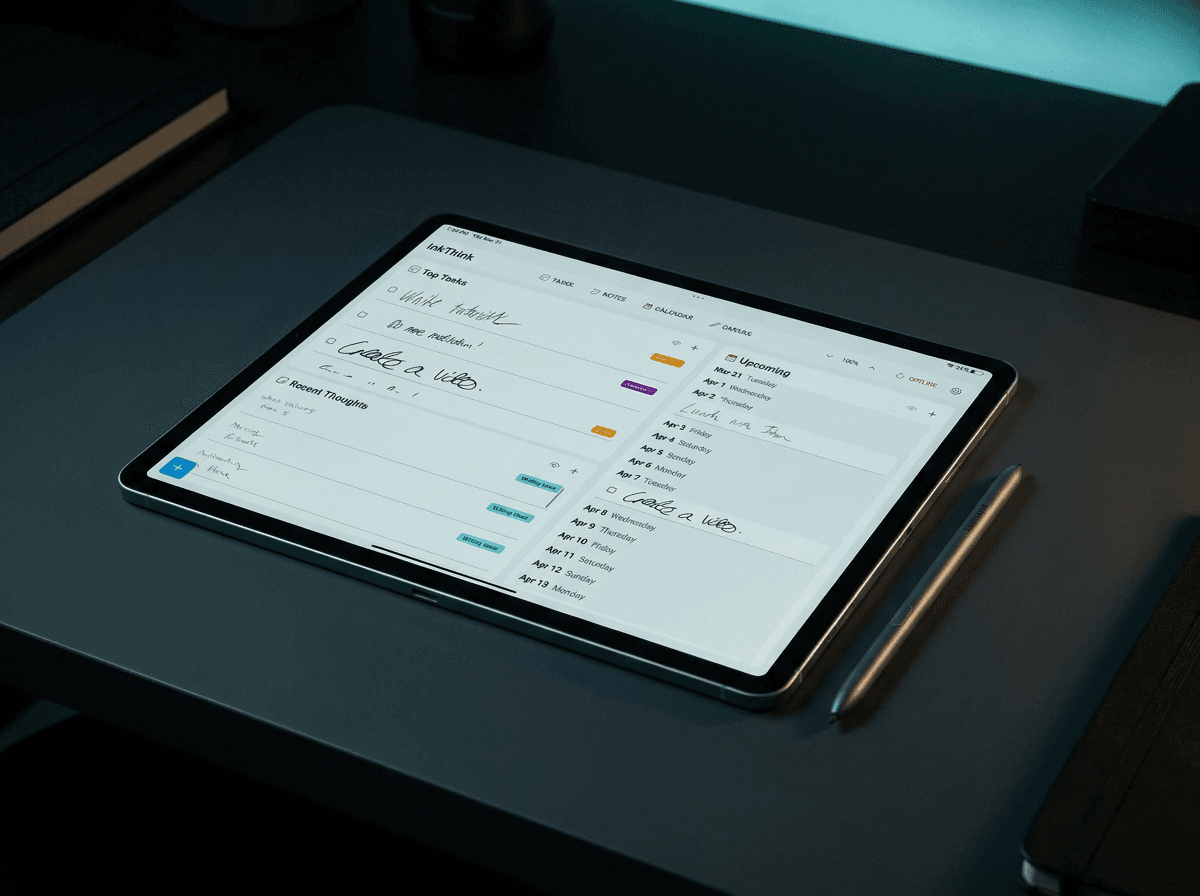
You write your tasks by hand. You write your calendar by hand. But the ink is data, not pixels. It moves. It reflows. It carries forward automatically. The handwritten to-do you wrote on Tuesday is still there on Wednesday if you didn't finish it, but it doesn't pile up as guilt in your Week view. It just rolls forward, the way a good system should.
Why InkThink Doesn't Need a Second Notebook
InkThink was built around a single idea: the things you write by hand should work as hard for you as the things you type. When you write a to-do in InkThink, you're not drawing on a static page — you're creating a living ink entry that knows what it is.
That means:
Your to-do list IS your planner. There's no "should this go in the planner or the notebook?" question. Everything lives in InkThink. The to-dos and the appointments and the notes and the calendar all share the same space. You see your whole day in one view, in your own handwriting.
Capture happens instantly. Open InkThink. Pick up the S Pen. Write the thing. Three seconds. There's no "is this important enough to put in my planner?" — you just write it, and the system figures out where it belongs across your Day, Week, and Month views.
Nothing gets transferred. A handwritten task you didn't finish on Monday shows up on Tuesday automatically. On Wednesday if you still haven't done it. No rewriting. No copying. No guilt. The ink just keeps flowing with you.
Your tablet is the portability. The argument for a separate notebook was that it's small and goes everywhere. So does your tablet. It's already in your hand, on your desk, on the kitchen counter. You don't need a separate physical object for the things you write — you need the system to do the right thing with them.
Rewriting is built in. When you look at your Week view at the end of the week, you see exactly what you actually wrote and what actually got done — without having to manually copy anything into a new page. The system shows you the real record. That's more honest than rewriting, because it doesn't let you quietly drop tasks you never finished.
When a Separate Notebook Actually Makes Sense
I'm not going to pretend the separate-notebook idea has zero merit. There are situations where it works:
You're somewhere you genuinely cannot bring a tablet (a pool, a beach, a hike)
You're in a meeting where a glowing screen is socially unacceptable
You're processing a sudden flood of thoughts and need to get them down without any UI in the way
But those are exceptions, not a default. Building your whole system around the assumption that you need a separate physical notebook to feel calm is, I think, solving the wrong problem. The problem isn't that planners are bad. The problem is that the planners we've been using don't respect the way we actually think.
The Real Reframe
The popular argument for separating to-dos is: "My planner stresses me out, so I'll keep tasks somewhere that doesn't."
The InkThink counter-take is: "Your planner stresses you out because it doesn't work for the way you think. Fix the planner instead of working around it."
When your handwritten to-do list and your calendar live in the same system — when the ink you write in the morning is still doing its job at night, and rolls into next week if it has to — you don't need a separate place to dump tasks. The system handles it. Your brain gets to rest. The guilt goes away because the unfinished tasks aren't sitting there in your face every time you open the planner — they're flowing quietly into the next view, ready when you are.
That's not a productivity hack. That's just a better tool for the way your brain already works.
FAQ: Common Objections to a Unified Stylus-First System
Doesn't keeping everything in one place make the planner overwhelming again?
Only if the planner treats everything equally. InkThink's Day view shows you just today. The Week and Month views zoom out, but they don't pile up — unfinished tasks roll forward without accumulating visual weight. You see the day you actually have, not a backlog.
What if I want a clean, pretty planner?
You can have that. InkThink's canvas is designed to look the way you want it to. Decorative borders, color-coded markers, neat handwriting — all up to you. The system stays out of the way of the aesthetic. The only difference is that the ink actually does something when you write it.
What about when the tablet isn't around?
InkThink syncs across Android, iOS, and Windows. If you write something on your phone on the way to work, it shows up on your tablet when you open it. The "always with you" problem that the notebook solved is solved differently — by making the same system available everywhere you have a screen.
Isn't this just a fancy digital notebook?
No — and this is the key distinction. A digital notebook is still a static page. You open a page, you write, the page sits there. InkThink's Intelligent Ink technology makes your handwriting a data object. It moves. It carries forward. It organizes itself. That's the difference between a drawing app with a calendar icon and a planner that was actually built for stylus input.
What if I like the ritual of writing in a paper notebook?
Then keep doing it. The point isn't to replace every paper notebook on earth — it's to stop pretending that a paper notebook can replace the connected, dynamic system that an actual planner is supposed to be. Use paper for journaling, sketching, processing. Use InkThink for the work of running your day.
How do I get started?
Download InkThink, open it on your tablet, and pick up your stylus. Write your first task. Watch it show up in your Day view, your Week view, and your Month view — all in one motion. That moment is when it clicks.
InkThink is developed by Sundaram Applied Technologies Inc., based in Los Angeles. Also check out NoteDex — our companion app for index-card note-taking and knowledge management. Together, they form a complete ink-first productivity stack.