What Are Bullet Journals? The Method That Took Over Productivity
A plain-language guide to the bullet journal method, why it went mainstream, the honest drawbacks of pen and paper, and how a hybrid system can give you the same loop without the friction.

I used to buy a fresh notebook every January and abandon it by March. Pretty covers, perfect lines, two pages of a habit tracker I never filled in, then a guilt spiral every time I opened the desk drawer. So when the bullet journal method started taking over productivity YouTube a few years ago, I dismissed it as "just another notebook system." I was wrong, and I wish I hadn't waited so long to try it.
Bullet journaling isn't about being crafty. It isn't about washi tape or perfect handwriting or some Instagram aesthetic. It's a way to turn a blank notebook into a thinking tool that actually matches the shape of your life. And once you understand what it is, why it took off, and what to do when pen-and-paper feels like a step backward, you can decide whether the method (or a software version of it) belongs on your desk.
What a bullet journal actually is
A bullet journal is a single notebook you set up yourself, used to capture tasks, events, notes, and ideas in a fast shorthand. You write a short bullet, mark it with a symbol (a dot for a task, a circle for an event, a dash for a note), and let the system evolve as you use it. There is no required layout. The whole point is that the notebook becomes whatever you need it to be, week by week.
The method was introduced around 2013 by a digital product designer in Brooklyn who wanted a notebook that could keep up with his attention. The book that grew out of it, The Bullet Journal Method, sold more than a million copies and made the framework a default option for anyone shopping for a productivity system. As of 2026, the hashtag has more than 12 million posts on Instagram, the official subreddit sits north of 200,000 members, and the publisher has its own line of notebooks, pens, and accessories.
The core idea is that traditional planners fail because they assume you know in January what your life will look like in July. They give you pretty boxes for days that don't matter, and no room for the day you actually had. A bullet journal flips that. The page is empty until you need it. You build the structure that fits the current chapter of your work, and you throw it away when the chapter ends.
Why it took off in productivity culture
The method hit at a moment when two things were true at once: people were drowning in apps, and people were tired of being distracted by them. The pitch was almost radical. Put your phone down. Pick up a pen. Use a system that requires friction, because friction is what makes you pay attention. The aesthetic that grew up around it (dot grids, minimalist spreads, no color coding) was the visual proof that you could be productive without being online.
The influencers who made it mainstream tend to fall into three buckets. The first group treats the notebook as an art project: elaborate monthly spreads, hand-drawn calendars, custom signifiers in five different pen colors. The second group treats it as a hard productivity tool: rapid logging, migration, monthly reviews, almost no decoration. The third group is somewhere in between, and most people who actually use the method end up there within a few months.
What's interesting is that the practice has spread well beyond the original productivity YouTube audience. Students use it to track classes and assignments. People in recovery use it as a daily check-in. Parents use it to manage the chaos of school pickups, grocery lists, and medical appointments. The framework is generic enough that any structured-thinking person can map their work onto it, which is why it survived the initial hype cycle that killed off most of the other "system" trends of the mid-2010s.
The four parts of a real bullet journal
If you've only seen the Instagram version, the actual structure is much smaller than you think. There are four pieces, and you can set all of them up in a fresh notebook in about ten minutes.
The index. The first few pages of the notebook are a table of contents. You write down the topic of whatever you're starting (a project, a month, a class) and the page number it starts on. The index fills up over time. When you run out of space, you keep adding to it.
The future log. A spread for the next six months where you write down dated events and tasks that fall outside the current month. This is where you capture "dentist appointment in August" or "submit the proposal by the 15th" so you don't lose them when the month changes.
The monthly log. At the start of each month, you turn to a new spread. The left page is a calendar-style list of dates. The right page is your action plan for the month, usually split into personal and work. This is where the big rocks of the month live.
The daily log. This is the part you actually do every day. You turn to the next blank page, write today's date at the top, and rapid-log everything you need to remember: tasks with dots, events with circles, notes with dashes, ideas with stars. It takes about a minute. You migrate unfinished items the next morning by deciding what to do with each one (do it, schedule it, drop it).
That's the whole system. The aesthetic, the collections, the habit trackers, the year-in-pixels spreads — those are all optional layers that people add once the core loop is working.
The honest drawbacks of pen and paper
I love the method, but it isn't magic. There are a few real costs that don't get talked about enough.
No search. If you wrote down a great idea in March and you need it in October, you're flipping pages. Indexes help, but you have to be religious about updating them or they're useless.
No backup. Lose the notebook, lose the year. Coffee spill, leave it on a plane, the dog eats a page — there is no undo button.
No reminders. A bullet on a page does not buzz your pocket. If you need a task to fire at 3pm on Thursday, the paper is not going to do that for you.
Rework. If you set up your monthly log and then your priorities change three days in, you either migrate everything (a real chore) or you abandon the spread and start over. People new to the method often burn through a notebook in a month because they keep re-doing the layout.
Pen pressure, hand cramping, smudges. Real but minor. Fountain pens are a mistake in a daily-use notebook. Gel pens and a quality ballpoint are the right tool.
None of these are dealbreakers, but they're real friction. If your work lives in a calendar, a CRM, and a team chat, a paper notebook can feel like a parallel universe you have to maintain.
How InkThink approaches the same problem
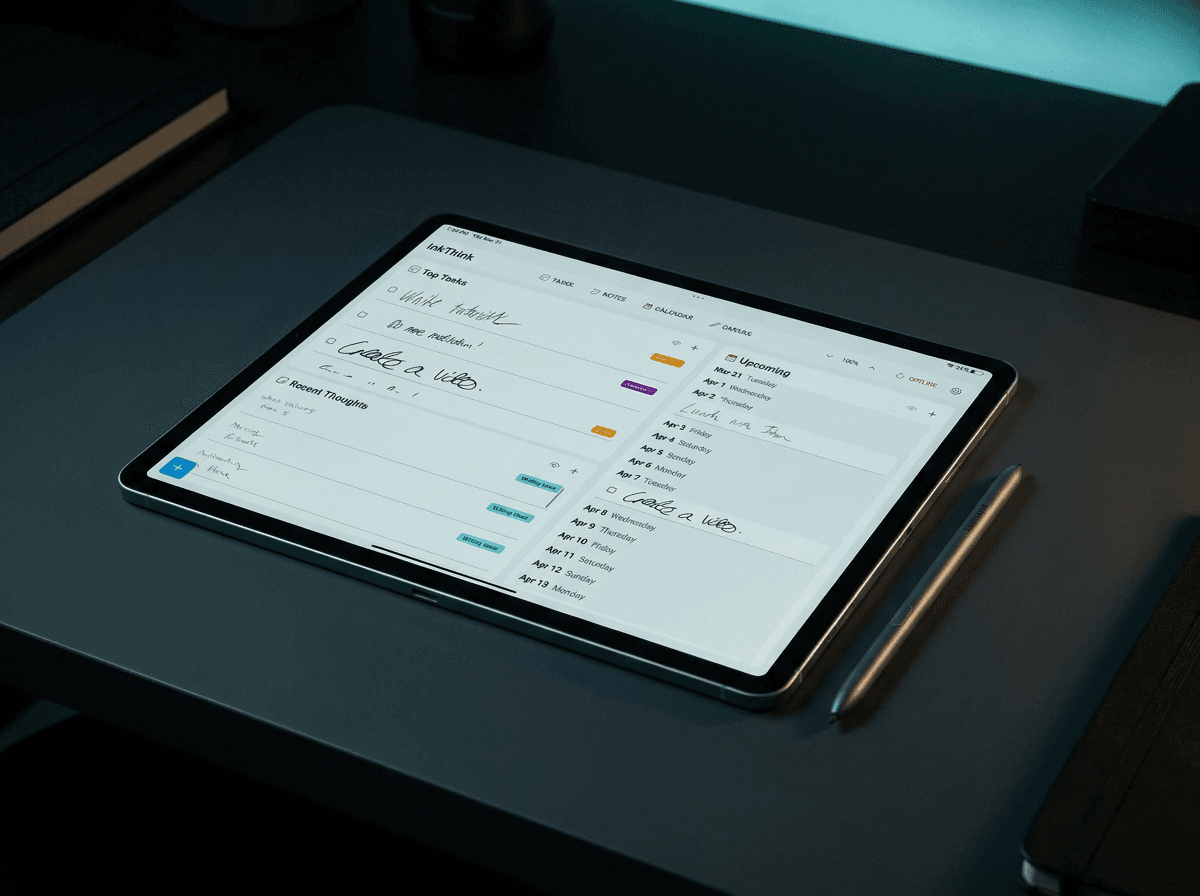
InkThink is the app I built because I wanted the structure of bullet journaling without the costs above. The core idea is that the rapid log, the index, and the migration step are the parts that matter. The paper, the handwriting, and the Instagram spreads are negotiable.
Here's what that looks like in practice.
Rapid logging with a stylus. You write the same way you would on paper, with a real pen on a tablet. The InkThink app is built around a Samsung Galaxy Tab and a premium stylus, so the writing feel is closer to a Moleskine than to a Notes app. You get the satisfaction of ink on paper and the structure of a real database behind it.
Index is automatic. Every bullet, collection, and habit tracker is searchable. The index page in InkThink updates itself. You tag a note with a topic once, and it shows up in that topic's index forever.
Future log is a real calendar. Drop a bullet on a date and it lives in your calendar view. InkThink pulls in the dates from your daily logs and rolls them up the way a paper future log would, but it's a live document instead of a hand-drawn grid you have to redo every month.
Daily log is a feed, not a spread. Today's bullets live in a single scrolling view. The migration step (deciding what to do with yesterday's unfinished items) is a one-tap action. InkThink shows you the open bullets from yesterday, you pick what to do with each one, and you move on.
Habit tracking is built in. The habit tracker that takes 30 minutes to draw on paper is a one-line setup in InkThink. You name the habit, pick the cadence, and a checkbox shows up on the right day. InkThink will also roll up a streak view so you can see the pattern without flipping pages.
Collections replace the special-spreads rabbit hole. Want to track books you've read, a project plan, a packing list, a weekly review? Make a collection. InkThink stores it as a structured list, you can link bullets to it, and it shows up in the index like a paper collection would. No drawing, no rulers, no redo when the page fills up.
Why a hybrid beats pure paper or pure digital
The most common question I get is some version of "why not just use Apple Notes" or "why not just stick with the paper notebook." The honest answer is that both pure options are worse than people think.
A pure digital app is fast and searchable, but the act of typing in a bullet feels weightless. You don't remember it. You don't process it. The cognitive research on this is consistent: handwritten notes lead to better retention and deeper encoding than typed notes, even when the typed notes are reviewed more often. If your goal is to actually think, paper (or a stylus) wins.
A pure paper notebook forces you to engage, but it punishes you for being a normal person with a search bar habit. The friction of flipping through pages to find a quote, a contact, or a project note adds up over months. By the end of the year, you're avoiding the notebook because looking something up is too expensive.
A hybrid, where you write by hand on a tablet that runs structured software, gives you the cognitive benefits of handwriting plus the search, backup, and reminder layer of software. InkThink is built specifically for that hybrid. The stylus is required. The structure is automatic. The notebook never runs out of pages, and you never have to migrate by hand again.
Reasons you might still choose paper (and that's fine)
I'm a builder, so I'm obviously biased toward the hybrid. But there are real reasons to stick with a paper notebook, and I don't want to talk anyone out of one.
If your work is mostly analog (writing, sketching, reading, parenting), a paper notebook is probably already in your hand. Adding a tablet to that workflow is a step backward.
If you're prone to screen fatigue and you already have a system that works, don't fix what's not broken. Pen and paper is genuinely good. The cognitive benefits are real, the distraction-free nature is real, and the aesthetic of a well-loved notebook is something software can approximate but never replicate.
If you're just starting out and you want to learn the method before adding technology, start with paper. Two months of daily logging on paper will teach you what you actually need from a system. Then decide if you want to upgrade.
If you love the artistic side of bullet journaling (the spreads, the colors, the art-supply ritual), keep doing it. The art is the point for some people, and the productivity is a bonus.
A good notebook is not the enemy. A bad system that you don't use is.
How to start, whether you pick paper or InkThink
Whichever side of the hybrid line you land on, the path in is the same.
Buy a dot-grid notebook. If you're going paper. The dots give you structure without locking you into a layout. If you're going InkThink, skip the notebook and grab a Galaxy Tab and a good stylus.
Set up the index, future log, monthly log, and daily log in that order. Don't start with a habit tracker or a mood log or a fancy weekly spread. Start with the four core pieces. They take ten minutes to set up.
Rapid log for one week without judging your output. Don't migrate perfectly. Don't color-code. Just write down what you need to remember, mark it with the right symbol, and move on. The system is a habit, not a deliverable.
At the end of the week, do a real migration. Look at every open bullet. Decide: do it today, schedule it, drop it, or move it to a collection. This is the step most people skip, and it's the step that makes the method work. The migration is the review.
Add one optional layer at a time. After a month, if you want a habit tracker, add one. If you want a project collection, add one. Resist the temptation to set up a 12-page spread in week one. You'll abandon it.
That's the whole loop. Index, future log, monthly log, daily log, migration, repeat. Whether you do it on paper or on a tablet is a personal choice. The method works either way.
The real reason bullet journaling stuck
The reason bullet journaling survived the productivity-trend graveyard isn't the aesthetic or the influencer ecosystem. It's that the method is built around an honest observation: most of what we do every day doesn't need an app, a project plan, or a calendar entry. It needs a line in a notebook, a symbol, and a moment of attention.
The systems that work are the ones that match the rhythm of actual life. Bullet journaling does. InkThink, for people who want the same loop with software support, does too. The trick is to find the version that you'll actually use, set it up once, and stop re-thinking your productivity stack every six months.
A notebook that you open every day will outperform a perfect system that lives in a drawer. A piece of software that gets out of the way will outperform an app that wants to gamify your morning routine. Pick the tool that lowers the cost of paying attention, and the rest takes care of itself.
— Prem, Creator of InkThink
Frequently asked questions
What does "bullet journal" actually mean?
A bullet journal is a customizable analog (or hybrid) system for tracking tasks, events, notes, and ideas in a single notebook. The original method, introduced in 2013, uses rapid logging with simple bullet symbols and a built-in index. The framework is intentionally minimal so the notebook can adapt to your work instead of forcing your work into a fixed template.
Do I need a special notebook to start?
No, but a dot-grid notebook is the most common choice because the dots give you a guide without locking you into a layout. Any blank notebook works for the first month. The official branded notebook is fine, but not required.
How long does it take to set up a bullet journal?
About ten minutes for the initial index, future log, monthly log, and daily log. The setup gets faster with practice. The first month takes the longest because you're learning the symbols and the migration rhythm. By month three, the setup is a five-minute habit.
Is bullet journaling better than a planner app?
It depends on what you need. Bullet journaling is better for thinking, processing, and retention because of the handwriting step. Planner apps are better for reminders, shared calendars, and search. A hybrid (handwriting on a tablet with software indexing) gives you both, which is what InkThink is built for.
Why do bullet journal videos look so different from the actual method?
Most YouTube and Instagram content focuses on the aesthetic side: hand-drawn spreads, color coding, custom signifiers. The actual method is much simpler and rarely makes for great video. If you want to learn the real method, the original book is the best source. If you want to learn the art side, the YouTube community is unbeatable.
What if I miss a day?
Just pick it back up the next day. The system forgives gaps. The migration step is what catches you up: review the open bullets, decide what to do, and continue. Missing a day is not a reason to abandon the notebook. Most long-term bullet journalers miss days. The habit is the daily return, not the daily perfection.
Can I use a digital app instead of a paper notebook?
Yes. Digital apps like InkThink, Notion, or a notes app can replicate the indexing, logging, and migration parts of the method. You lose the cognitive benefits of handwriting if you type, but you keep the structure. A stylus-based app on a tablet gives you the best of both worlds: handwriting for retention, software for search and backup.
Is there a difference between the bullet journal method and regular journaling?
Yes. Traditional journaling is reflective writing about your day, your feelings, or your experiences. The bullet journal method is a structured productivity system that uses the same notebook to track tasks, events, notes, and ideas. Many people combine both (a bullet journal for the productivity layer, a separate journal for reflection), but they serve different purposes.