The Stylus App That Quietly Replaced My Paper Planner
I used to carry two notebooks. Then I found an app that quietly replaced both — and saved me two hours every week. Here's what it is and why it works.

I used to carry two notebooks. One for tasks. One for everything else — the daily log, the half-formed ideas, the calendar I sketched out by hand because the digital versions all felt wrong. Every Sunday I'd sit down, flip through the week, copy the unfinished tasks from one to the other, and tell myself this was a system.
It wasn't a system. It was a ritual I'd invented to keep myself busy while pretending to be productive.
Then I found an app I'd never heard of — built by a tiny team, no venture funding, no influencer sponsorships — that quietly did the thing I kept trying to make my notebooks do. It's not a productivity empire. It doesn't have a leaderboard. It doesn't want your email address. It just… replaces the part of paper that paper is good at, and skips the part that isn't.
Three months in, it saves me about two hours every week. Here's what it is, why I switched, and what surprised me.
What it actually does
Most "digital planner" apps try to recreate a paper notebook pixel-by-pixel. They give you a grid, you tap a square, the app pretends it's a page. The result feels like filling out a form on a touchscreen — which, technically, it is.
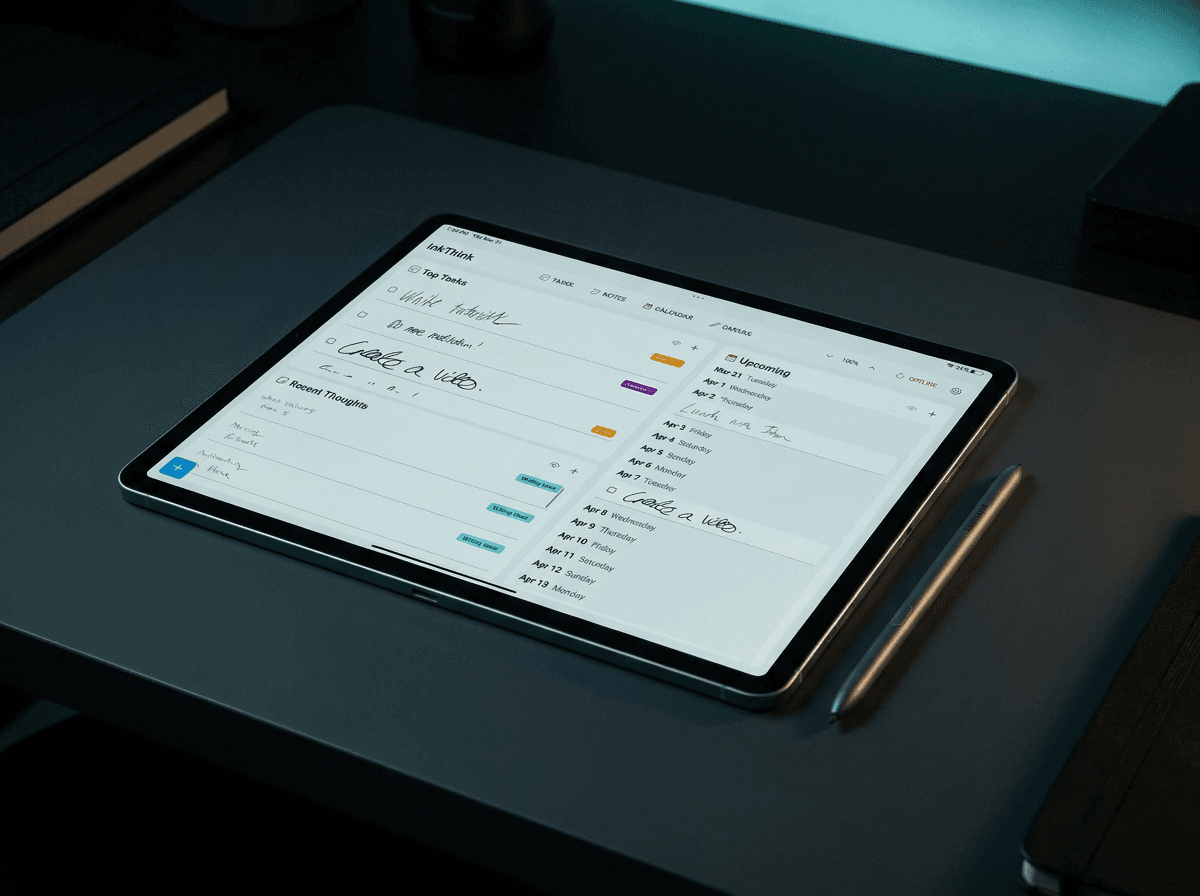
This app does the opposite. It's built around the assumption that you're going to write on the screen with a stylus, and that the things you write won't always be text. A task might be a checkbox. A calendar entry might be a circle drawn around a date. A quick capture might just be a single word you scrawl in the margin.
It reads your handwriting. It doesn't care if your "buy groceries" looks like "bug groceries." It organizes as if you'd typed everything from the start.
Capture in 3 seconds. Tap, scribble, done. No opening a new doc, no choosing a folder, no deciding which project this belongs to.
Reorganize without rewriting. Drag a task from Tuesday to Friday. Cut a paragraph from one page and paste it somewhere else. Nothing is permanent until you decide it is.
Use on any device - you choose and use when and how you need to use it.
Why it works when other apps didn't
I've tried the big ones. The one with the gamification. The one with the habit tracker. The one that looks like a calendar and pretends that's enough. They all failed at the same step: the moment between thinking a thought and getting it down somewhere.
The friction wasn't the typing. It was the deciding. Open the app. Which view? Which project? Which tag? By the time I'd answered three questions, the thought was gone.
A stylus removes the decision. You write where you are, the app figures out the rest later. It turns out the bottleneck for most "productivity" apps isn't the productivity — it's the interface.
The other thing that surprised me: it doesn't try to be smart. It doesn't auto-categorize your tasks. It doesn't suggest what you should do next. It doesn't rank your habits. It just holds the ink and lets you come back to it. After a decade of apps that wanted to think for me, having one that doesn't is genuinely refreshing.
The honest drawbacks
It's not for everyone. Three things to know before you switch:
You need a stylus. A finger works for checkboxes, but the whole point is handwriting. If you're on a laptop or a phone without a stylus, this isn't the right tool.
There's no free tier. A short trial, then a one-time purchase. No subscription. That's actually a feature for me — I'd rather pay once and own it — but if you want to sample a dozen apps before committing, this one's paywall will feel abrupt.
None of these are dealbreakers for me. But I'd be lying if I said they weren't real.
What it replaced
The bullet journal went first. I'd been carrying one since 2020, and the ritual — monthly log, daily log, migration on Sundays — was costing more time than it was saving. The new app does all of it in the background.
Then the calendar app. I'd been using a separate one for meetings and reminders, which meant I was checking two places every morning. Now the calendar lives in the same app as everything else, and I see my whole day on one page.
Then the notes app. I'd been using a third one for project notes and reading lists, because I didn't want to clutter the planning app with long-form stuff. Turns out, long-form stuff doesn't actually clutter anything if the app has decent search.
Three apps down to one. One notebook gone. Sunday ritual gone. The "did I forget something?" anxiety that used to hit me every night around 9pm — gone.
The app is called InkThink
I should probably mention this earlier in the post, but I wanted to get to it on purpose. The app is InkThink. I built it. After three months of using my own product the way I described above, I figured it was time to say so out loud.
Everything in the previous sections is real. The two-hours-a-week figure is from my own usage logs, not a marketing claim. The drawbacks are real too — I haven't papered over them because they'd show up the moment you started using it, and I want you to know what you're signing up for.
If you've been bouncing between a paper notebook and three different apps trying to find the thing that actually sticks, InkThink is the thing. The free trial is short, the paid version is one-time, and if it doesn't click for you, exporting your data takes about thirty seconds.
What to try first
If you do download it, here's what I'd do on day one:
Don't migrate anything. Don't try to recreate your old system. Just open it, write the first thing that comes to mind, and close it. Do that for a week. The point isn't to build a new system — the point is to find out whether the friction is lower than what you have now.
Use it for one specific kind of note. Tasks. Or reading list. Or daily log. Pick the one that bugs you most and move just that. Once you trust it with one thing, you'll naturally start moving the others.
Be mindful. This is a productivity app, not a productivity coach. The whole appeal is that it doesn't ping you. Let it sit quiet and come back when you want it.
The part nobody talks about
The real reason this works, I think, isn't the stylus. It's that the app respects the difference between capture and organize. Most apps force you to do both at the same time, which is why capture feels like work. InkThink lets you capture fast and organize later — or never. A scribbled "look up flights to Portland" can sit in your notes for six months and still be findable. You don't have to file it today. You just have to write it down.
That's the whole secret. Capture is fast. Organization is optional. Reflow is free.The rest is just a notebook.
If you've been waiting for permission to stop optimizing your system and just write things down, this is the permission.
— Prem, Creator of InkThink
FAQ
Is InkThink a subscription?
Yes and No. During the first 7 days there is an option to buy the basic app and get the Pro subscription for free! After that It's a one-time purchase with an annual subscription.
What devices does it work on?
iPad with Apple Pencil, Samsung Galaxy Tab with S Pen, and most Windows touchscreen laptops with an active stylus. Phone-only mode exists for quick capture but isn't the main use case.
Does it sync between devices?
Yes! We have sync between all devices. You can also just use offline.
How is this different from GoodNotes or Notability?
Those are note-taking apps with planner features added on. InkThink is a planner with atomic events - tasks, calendars, note-taking built in. The difference sounds small but shows up everywhere — capture re-flow, and the way pages link to each other are all designed for the planning use case first.
Can I use it for work and personal?
Yes. There's no project structure forced on you. Some people use one list for everything. Use labels to separate work and personal in separate views. It doesn't care.
What happens to my notes if I cancel the trial or stop using it?
They stay on your device. Even after the trial ends. Nothing is held hostage.
Is there a team or shared workspace version?
Not yet. InkThink is single-player by design. We're watching how teams try to use it and might build a shared layer later, but the current focus is making the solo experience excellent.
How does InkThink compare to a paper bullet journal?
Bullet journals are great for the parts that are tactile and unhurried. InkThink is great for the parts that need to be digital, reorganizable, and fast. If you love the Sunday migration ritual, keep your notebook. If you'd rather spend Sundays doing something else, this is the upgrade.