The Project Page That Thinks Itself: Why Your Brain Shouldn’t Be a Project Tracker
Your brain wasn’t designed to be a project tracker. Here’s the stylus-first system that absorbs the cognitive load — and how to set it up in three minutes.

Out of sight, out of mind isn't just a closet problem. It quietly decides which of your projects actually get done.
You know the feeling. You had three perfect steps in your head on the walk home. By the time you sat down at your desk, the steps were gone. You opened a blank doc, stared at it, and re-engineered the plan from scratch — if you bothered at all. The project slipped a day. Then a week. Then it joined the graveyard of "I'll come back to that."
This isn't a willpower problem. Your brain wasn't designed to be a project tracker! It was designed to have ideas, make connections, and solve problems — not to serve as a filing cabinet for your entire professional and personal life. Every project you try to hold in your head is competing for a resource your brain has in tiny, finite supply.
So the real question isn't "how do I remember better?" It's "how do I build a system that remembers for me — and stays visible?"
The science: why memory fails projects
Two things are working against you.
Memory is reconstructive. Every time you "remember" something, you're not pulling a clean file off a shelf. You're re-assembling it from fragments, and the assembly looks slightly different each time. The three steps you had on the walk home? They were already degrading the moment you formed them. By the time you sat down, you weren't recalling — you were reconstructing under pressure, and the reconstruction was a worse version than the original.
Working memory is tiny. The classic 7±2 ceiling isn't a motivational poster — it's a structural limit. You can hold a handful of active projects in mind at once, tops. The moment you add an eighth (the side hustle, the bathroom reno, the kids' school play, the book club you said yes to), at least one of the other seven starts falling off the edge. You didn't forget it. You ran out of bandwidth.
This is why the cognitive load research (Sweller and others) keeps pointing to the same conclusion: externalizing information to a trusted system frees cognition for the work itself. The point of a planner isn't to give you something to write in. The point is to take the integration layer — the part that constantly asks "what's next? where was I? what was the third step?" — and move it somewhere that doesn't fatigue, forget, or reconstruct badly.
The paper framework that actually works
There's a quiet, very-online community of paper-planner obsessives who have spent a decade refining the anatomy of a project system that survives contact with real life. The version that stuck has five moving parts:
Backlog / Inbox. Everything lands here first. A brain dump, a voice note, a napkin sketch. The only rule is: it doesn't leave your head until it leaves your head and lands in the inbox.
Cold storage. Paused, not dead. The side project that's stuck, the trip you're not taking this year, the book idea that's not ready. It has a place, but it isn't in the active rotation.
Master list (the project index). A single page that shows every active project at a glance: title, status, deadline, color-coded by life area. The whole point is that you can flip to one page and see "everything that's alive" in five seconds.
Project pages. One page per project. Title, deadline, task list, status, a notes box. Not a wiki — just enough structure to make the project feel real and to hold the steps you'd otherwise lose on the walk home.
Recurring-project templates. For the things you do every week or every month — a content batch, a planning ritual, a client check-in — draw the template once, then duplicate it. Every recurring project starts at "already half set up."
The genius isn't any one of these pieces. It's that they're all visible, all the time. There's no out-of-sight, out-of-mind with a master list sitting at the front of your notebook. Everything is in sight, so everything is in mind, until you check it off.
The community's color key has converged on roughly the same scheme for a reason: yellow for the big "I really need to do this" bucket, pink for personal, blue for writing or deep work, green for done, red for canceled. When the master list is a full rainbow of life areas, you can scan it the way you'd scan a bookshelf — and your brain instantly knows what kind of work today is going to be.
Why stylus ink is the upgrade
Paper planners are brilliant, right up until they aren't. You lose the notebook. The master list is in last quarter's volume. The recurring template got water-damaged. The color key you invented is unintelligible to your future self at 11pm. The paper version of the system asks you to be the integration layer — to remember which page the project is on, to flip back to the master list every time you finish a task, to manually re-tape the template every month.
InkThink absorbs the integration layer into the ink itself.
Here's what the same five-piece system looks like in a stylus-first world:
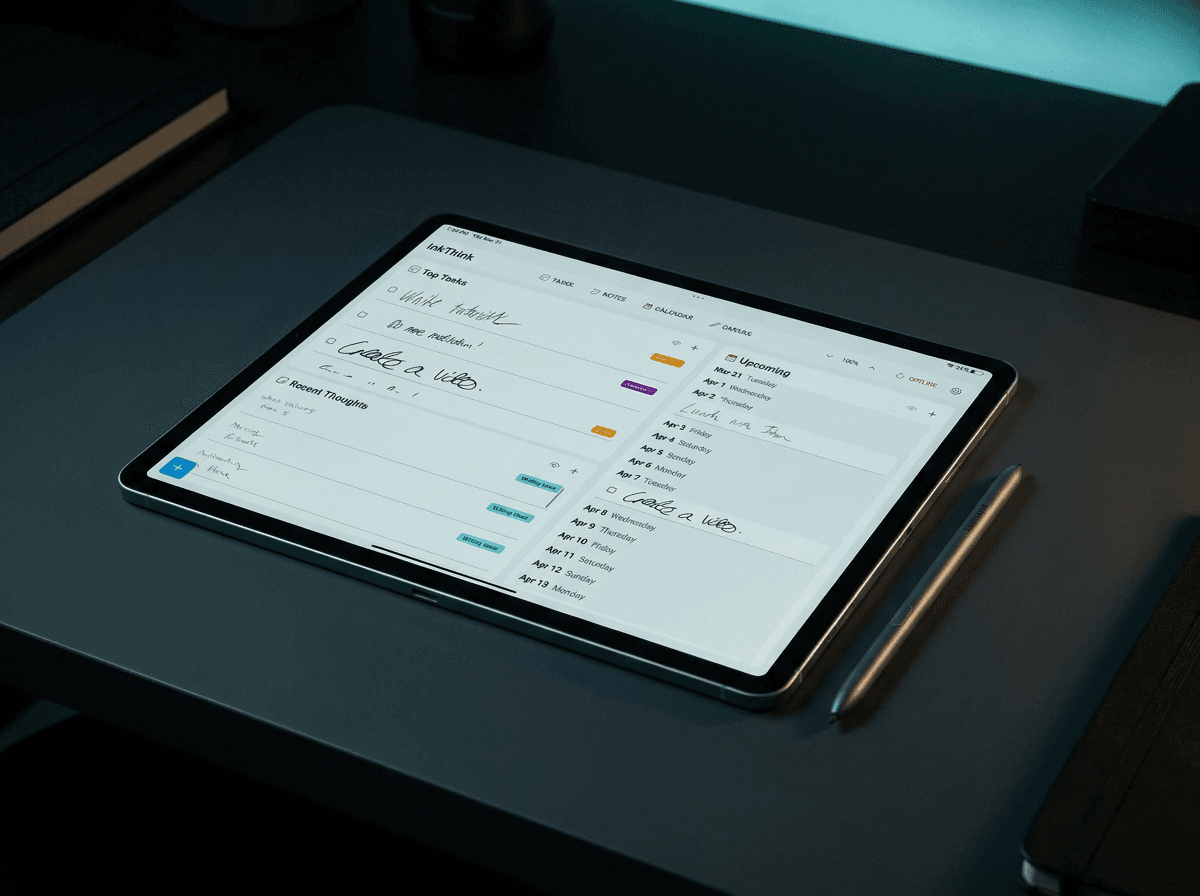
Backlog becomes a quick-capture ink note that auto-flows into your weekly dashboard via Intelligent Ink. You scribble "book club — pick novel for March" in the margin of a meeting page. By the time you sit down to plan your week, it's already sitting in the inbox column, with a deadline you can drag if you need to.
Master list becomes a live, two-pane ink canvas. Status columns on the left (idea → planning → doing → revisions → done), project cards on the right, all hand-drawn, all reflowable. Move a card from "doing" to "revisions" by writing "done" in the box — the layout shifts around it.
Project dates become ink-first events where a deadline circled in red stays red even when the calendar layout around it changes. Move the project from this week to next week and the red circle doesn't lose its meaning. The ink remembers what you meant.
Atomic Ink is the piece that doesn't have a paper analog. Mark a project as "idea" today. Three months from now, when today's date makes it relevant, the ink auto-promotes it from cold storage to your active rotation. The system isn't just storing — it's responding to the calendar.
The thesis: paper planners make you the integration layer. InkThink absorbs the integration layer into the ink itself. The thing that used to be "remember to check the master list" becomes "the ink already checked the master list and moved the card."
From filing cabinet to thinking partner
The paper-planner community has a line that captures the whole project: "The only thing we ever have to remember is where to look." A single source of truth, one place, one rule.
Stylus ink takes that one step further. The ink doesn't just sit there waiting to be looked at. It actively participates. A circled deadline reflows when the schedule shifts. A project you marked "idea" three months ago quietly surfaces the morning it becomes relevant. The master list doesn't just store your projects — it watches the calendar and reorganizes itself around what's about to be due.
The single source of truth doesn't just store. It responds.
That changes what it feels like to use a planner. The paper version is a passive surface. The stylus version is closer to a thinking partner — one that doesn't get tired, doesn't reconstruct badly, and doesn't lose the notebook.
Set it up in three minutes
If you want to feel the difference today, the shortest path is this:
Open InkThink and draw a 3-column master list on a canvas page: Active / Paused / Done. Spend two minutes dumping every project you can think of into the right column. Don't organize — just get them out of your head and onto the ink.
Pick one project (a weekly newsletter, a content batch, a client check-in, a Sunday planning ritual) and create tasks for it in task list and set the project label, and make notes in notes section if needed.
Use Intelligent Ink to mark a deadline. Circle a date in red on calendar. Open the month view. Watch the month view reflow in real time. That moment — when the layout moves because the ink moved — is the moment you stop being the integration layer.
Three minutes. One master list, tasks captured, one deadline that reflows. Everything else builds on that.
FAQs
Isn't this just a fancy note app?
No — and the difference is structural. A note app stores your words and lets you search them. InkThink stores your ink and lets the ink participate. A deadline you circle is data the system can act on. A project you mark "idea" is data the system can promote. The integration layer lives in the ink, not in you.
I already use a paper planner. Why would I switch?
You might not need to. Paper works until the system outgrows your ability to hold it in mind — and that moment is different for everyone. If your master list is in last quarter's volume, if you've lost the template twice, if the color key has gotten too elaborate for you to decode in 10 seconds — that's the signal. The stylus version is the paper version with the integration layer extracted.
What about apps like Notion or Todoist?
Those are excellent tools for storing and querying structured data. They're weaker at the part of project work that is genuinely thinking — sketching a layout, drawing a flow, circling a deadline in red because it feels late. InkThink lives in the space between "structured data store" and "blank notebook." You draw first, the system organizes after.
Does the Intelligent Ink really reflow, or is that marketing?
It really reflows. The simplest test: circle a date in red on a project page, then move the project to next week. The red circle stays red. Open the month view — the circled date is now in next week's column, with the same red treatment. The system preserves the meaning of the ink as the layout changes around it.
What if I don't have a stylus?
You can use InkThink with a finger, a mouse, or a trackpad, but the experience is fundamentally a stylus experience. The Intelligent Ink features — the circled deadlines, the reflowing cards, the hand-drawn templates — depend on a writing surface that feels like writing. The free trial ships with a cheap capacitive stylus if you want to test the workflow before buying hardware.
How is this different from a digital bullet journal?
Digital bullet journals are great for replicating the structure of a BuJo — daily logs, rapid logging, migration. InkThink is a project tracker with the cognitive load externalized into the ink. Where a BuJo asks you to migrate items weekly, InkThink watches the calendar and does the migration for you. Where a BuJo asks you to re-tape a recurring template, InkThink duplicates the ink with a tap.
Is there a free trial?
Yes — Android, iOS, and Windows, full feature set, no credit card. At the end of the trial you can convert to a one-time purchase for the base app and a subscription for Pro features. But if you buy the app in the first 7 day trial you get the Pro subscription for free! You pay once, you own your project pages forever. No "pro plan," no "premium tier," no monthly bill that quietly doubles in year two.
What if I have 30+ active projects?
The system scales. The master list can hold as many cards as fit on the canvas, and you can split by life area (work, personal, side projects) into separate master pages that share the same ink vocabulary. The 7±2 limit is on what your brain can hold — InkThink doesn't have that limit, which is the whole point.
Does it work offline?
Yes. The ink, the reflow, the templates, the master list — all of it works without a network connection. The sync happens when you reconnect. Your projects aren't held hostage by a wifi signal.
What's the catch?
There isn't one, but the honest disclosure: InkThink is a stylus-first app on a tablet or 2-in-1. If you do all of your project work on a phone, the experience will feel cramped. The sweet spot is an S Pen–equipped Samsung, a Surface with a Slim Pen, or an iPad with a Pencil Pro. The free trial will let you know in five minutes whether your hardware is up to it.
Your brain is for having ideas. InkThink is for everything else.