Productivity Field Guide and InkThink
A four-quadrant field-guide layout turns a digital notebook into a single place to capture, organize, and act on every idea. Here is how InkThink fits that frame, and why a stylus-first planner outlasts every multi-app stack I tried.
I tried to make four productivity systems work at the same time last year. Notes app for capture, calendar for time, project board for work, paper notebook for thinking. None of them talked to each other. Every week I'd lose the same idea three times because it landed in the wrong inbox and I never went back for it. Then I started treating my digital notebook like a productivity field guide — a single place that does all four jobs — and the duplicate-thinking stopped. Here's how InkThink fits that frame, and why a stylus-first digital planner is the missing piece most systems miss.
If you've ever felt like your productivity stack is working against you, this is the post. I'm going to walk through what a field-guide approach actually looks like in practice, why the four-quadrant layout keeps showing up in every method that lasts longer than a month, and how a digital notebook with a real pen changes the math on capture. You'll come out with a layout you can set up tonight and a short list of habits that compound.
The honest reason most productivity stacks fail
Most of us don't have a productivity problem. We have a handoff problem. The idea lands somewhere — a Slack message, a phone note, a paper scrap, a voice memo on a drive home — and then we never see it again in the place where we actually do the work. Handoffs are where ideas die. Every extra app in your stack is another handoff. Every extra handoff is a chance to lose the thing that mattered.
When I tracked my own misses for two weeks, almost all of them had the same shape: I captured the idea in one place, intended to "process it later," and "later" never came. The processing step requires you to come back to the inbox, re-read it, decide where it goes, and then write it again in the new home. That's three actions. Three actions is one too many for most days, which is why the inbox piles up and the ideas rot.
A field-guide approach collapses those three actions into one. You write it once, in the place it will live. The capture and the filing happen at the same moment because the page is the filing cabinet. The only system I've ever kept for more than six months is one where the path of least resistance was also the path of least loss.
What "field guide" actually means
The phrase is borrowed from the world of naturalist notebooks — a small, durable, hand-carried book where you record what you saw, what you noticed, and what to do about it next. The structure is simple: an index, dated entries, sketches when words aren't enough, and a small set of recurring questions that keep pulling you back to the same page. It's not a system for organizing information. It's a system for keeping a person in conversation with their own thinking over months and years.
For productivity, that translates into four jobs a single notebook has to do:
Capture — get any idea, observation, or to-do out of your head and onto a surface within ten seconds.
Process — when you re-read it, decide in one pass whether it stays, moves, or dies.
Organize — keep the keepers in a layout your eye can scan without thinking.
Act — translate the keepers into the next concrete step on a date.
A field-guide notebook is the only tool I know of where those four jobs live on the same physical page. The act of writing the to-do is the act of capturing it is the act of scheduling it. That collapse is the entire trick.
The four-quadrant layout, explained
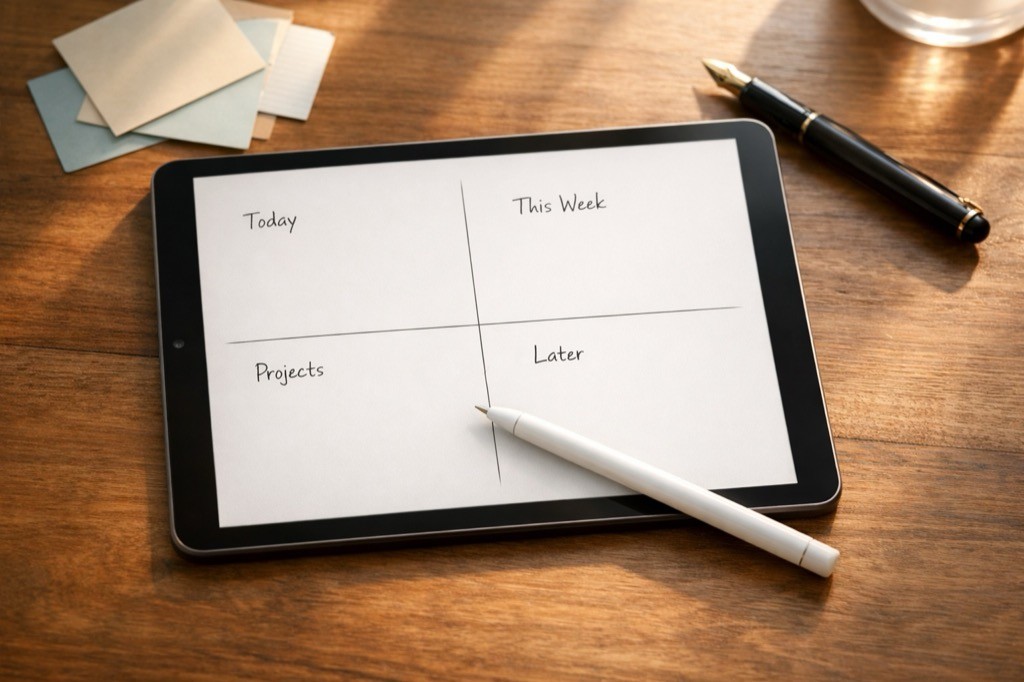
Open the page to any new day and divide it into four blocks. Top-left: Today. Top-right: This Week. Bottom-left: Projects. Bottom-right: Later. That's the layout. You can spend a week arguing about how to name them and what the line thicknesses should be — or you can set it up in two minutes and start.
The job of each quadrant is brutally simple:
Today is the only quadrant you have to look at. Everything in here must be done today or moved out tonight.
This Week is the parking lot for things that have a known date but not today. Monday's meeting, Thursday's call, Saturday's errand.
Projects is for things bigger than a single task. The active ones live here; the dormant ones go to Later.
Later is the archive of stuff you don't want to forget but don't want to see every day. Review it once a month.
The discipline is in the moving. A task that doesn't get done today moves to tomorrow's Today quadrant at the same time you write tomorrow's top three. A project that loses momentum drops to Later and gets re-evaluated on the first of the next month. A Later item that comes back to life jumps straight to This Week with a date. The page never lies to you because the page is the only truth you maintain.
Why digital + stylus beats paper for this
I love paper. I've used a paper notebook for most of my adult life and I will probably keep one in my bag for the rest of it. But for a four-quadrant field guide, paper runs into a wall at the second month: you can't search it, you can't duplicate an entry to a different page without rewriting it, and you can't undo a stroke without leaving a scar on the page.
A digital notebook with a real stylus — InkThink runs on iPad with Apple Pencil, on Samsung with S Pen, and on Boox with the standard EMR pen — gives you paper's drawing feel plus three things paper can't do:
Edit — you can edit what you wrote, even if it was six months ago, in under a second.
Re-layout — you can move an entry from Later back to This Week by dragging it, not by rewriting it.
Undo — the catastrophic mistake that ends a paper notebook is a non-event on a tablet.
What you keep from paper is the part that matters: the friction of writing slowly enough to remember. A stylus on a tablet gives you most of the drawing feel of a real pen without the friction of the bits that don't help. If you've abandoned a paper planner because you kept losing the page, switching to digital isn't selling out — it's keeping the same method alive.
The morning routine that keeps the page honest
The hardest part of a four-quadrant system is not the setup. It's the empty-page fear that hits every morning at 6:47am when you're staring at a blank quadrant and the day's already noisy. The fix is a five-minute opening ritual:
Read Yesterday's Today quadrant. Anything not done moves to Today's Today, top of the page.
Write Today's top three. Pick three from This Week that have to land today. If you can't pick three, your This Week list is too vague.
Move one Project forward. Pick one active project and write the single next step into that quadrant.
Glance at Later. Skim, don't process. Anything that jumps out moves to This Week with a date.
Set the date in the header. This sounds silly. It anchors you.
That whole sequence takes five minutes. It works because it removes the question "where do I start?" every morning for the rest of your life. The answer is always the same: read yesterday, pick three, write them down, then go.
How InkThink turns this into a daily habit
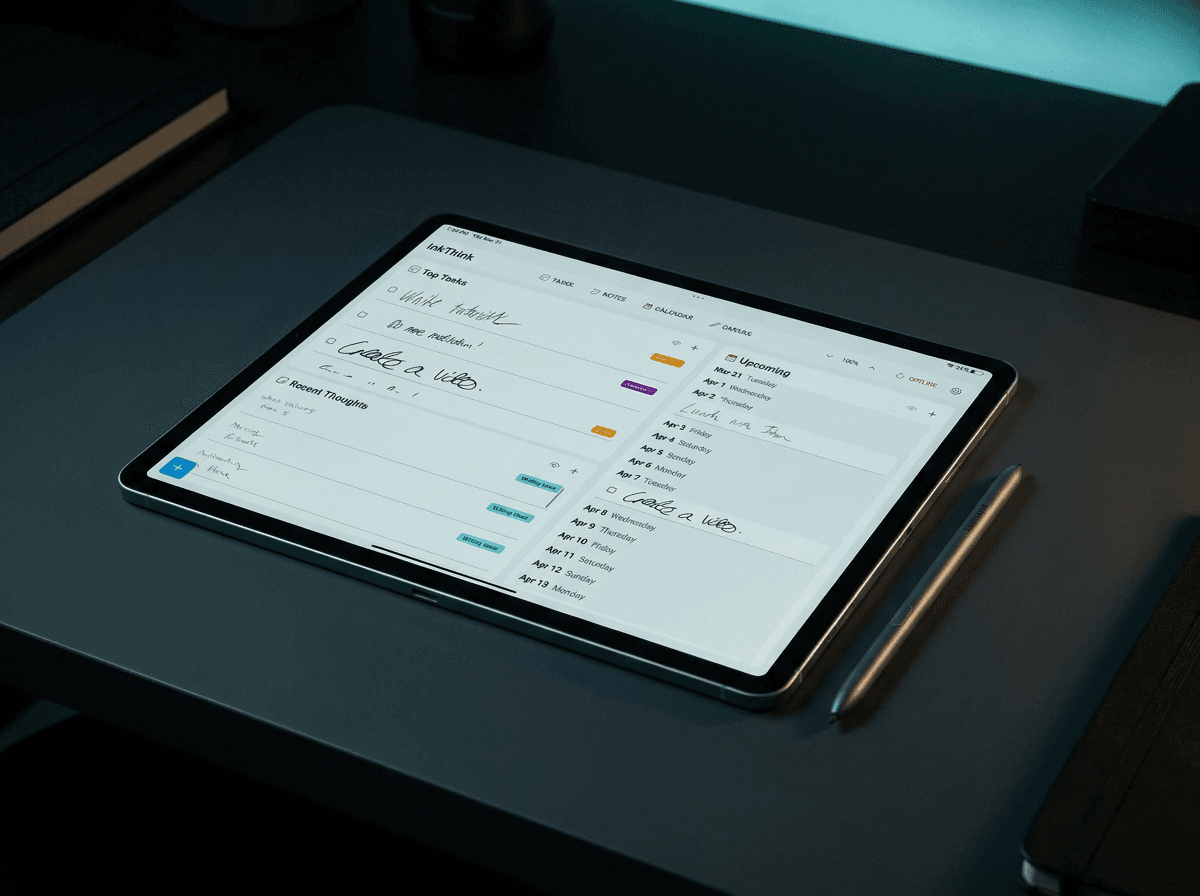
InkThink is built around the four-quadrant field guide, and we interpret into tasks, notes, calendar and mindmap views. The Tasks page allows you to have tasks with Labels so you can organize and filter - capture as inbox (un tagged), Today, Week, Later labels. Add dates and or make events to view.
Why InkThink shines:
Always Updated — your morning five-minute ritual becomes a single tap. The Task view allows you to see in a multi column Kanban style to visualize your work for the week. It's always there and up to date, not needing to be rewritten into another page or notebook.
Reflow — each entry can be edited and moved around, labels updated as you work through the process day by day. Something tagged for 'Week' now becomes 'Today'
Convert — Notes can be converted into Tasks, so you can capture without things getting cluttered.
Always There — If you forgot your Notebook you are stuck. With InkThink sync you can sync data between your devices so your plans and tasks are always there for you at the right place at the right time.
InkThink doesn't try to be a project management tool, a calendar, or a CRM. It's a digital task and notebook that happens to have a very specific set of layouts. That constraint is what makes it work — the moment a tool promises to do ten jobs, the four-job field guide stops being a field guide and starts being a dashboard.
Frequently asked questions
Doesn't four quadrants feel too simple for a real workload?
On paper, the simplicity is the feature. The moment you add a fifth quadrant, you spend the morning deciding which quadrant the new task belongs to. The whole point is to spend zero minutes deciding. However the good thing about InkThink is that you can add as many labels (quadrants) that you like.
What if a task doesn't fit any quadrant?
It goes in Later. Later is the overflow bin. If something sits in Later for more than thirty days, either delete it or admit it's a real project and give it a top-level page in Projects. Or if you are using InkThink, make a Label for Tasks that suits you!
How is this different from a bullet journal?
The bullet journal is a paper system with monthly logs, daily logs, and rapid logging. InkThink is a digital notebook that gives you a task layout every day. Both work. The difference is digital flowability, undo, and the fact that your tablet doesn't run out of pages at the bottom of the third month.
Can I use InkThink for work and personal in the same notebook?
Yes. Most people keep one notebook for everything and use color or a tag to separate work from personal. Splitting into two notebooks doubles the maintenance cost and halves the search surface.
What about recurring tasks?
Recurring tasks go in This Week with a checkmark on the days they happen. Daily habits live in a separate habit tracker — InkThink ships with one — because mixing recurring micro-actions into Today's top three buries the real work. You can label a task as 'Habit' and it activates the micro Habit tracker in InkThink!
How long before the system sticks?
Thirty-one days is the realistic answer. The first week you'll forget to move Yesterday's tasks. The second week you'll forget to review Later. The third week the morning ritual starts to feel automatic. By day thirty-one you'll wonder how you worked without it.
What if I miss a day?
Pick up where you are. Don't backfill. The whole point of the field guide is that the page never lies — a missed day is a missed day, and the next day's Today starts blank. Backfilling creates a fake record that you'll trust later, and trust in your own system is the most valuable thing it owns.
Does it work on Android?
Yes. InkThink ships native apps for iPad (Apple Pencil), Android tablets (Samsung S Pen and others), and Boox e-ink tablets. The four-quadrant (column) task layout is available on all three.
Is there a free version?
There's a 7-day trial with all features unlocked. If you buy within the 7 days you can make InkThink a one time purchase since you will get the Pro features subscription for free. After that, InkThink is a one-time payment and optional annual subscription for Pro features.
Can I export everything if I stop using InkThink?
Partially - currently you can export notes and mindmaps - we are working on providing full export.
Closing thought
The fastest way to fix a productivity stack isn't a new app. It's reducing the number of handoffs. A four-quadrant field guide on a digital notebook collapses four systems into one page, removes the daily setup question, and gives you a record you can search six months later. If you've been cycling through planners for years, this is the version that lasts — not because it's clever, but because it's simple enough that you don't have to think about it. You can adopt this approach using a 4 column Task layout in InkThink to reflect the quadrants.
InkThink is built for this. If you want to try the four-quadrant layout tonight, the trial is on the App Store, the Play Store, and the Boox store. Set it up once, do the morning ritual for thirty-one days, and see how it feels.
— Prem, Creator of InkThink