How to Think on Paper (When Your Paper Thinks Back)
Justin Sungs thinking-on-paper method, applied on a stylus-first planner that does the connecting for you. Three moves: write the question, compress the answer, let the planner thread it across every view.

Most people write things down so they can come back to them. Dr. Justin Sung, a learning coach and the author behind some of the most-circulated study advice on YouTube, says that's exactly the wrong way to think about the page. "Learning faster means solving problems faster," he opens. "It means making decisions faster. It means not spending all your time relearning something you already learned 3 weeks ago." His fix is a verb, not a noun: thinking on paper. The act of writing IS the processing. The notebook isn't a storage device. It's a thinking partner.
This piece is a how-to built on Sung's "Thinking on Paper" method. Watch his video here. The InkThink spin: applying his technique on a stylus-first planner that does the reflow for you.
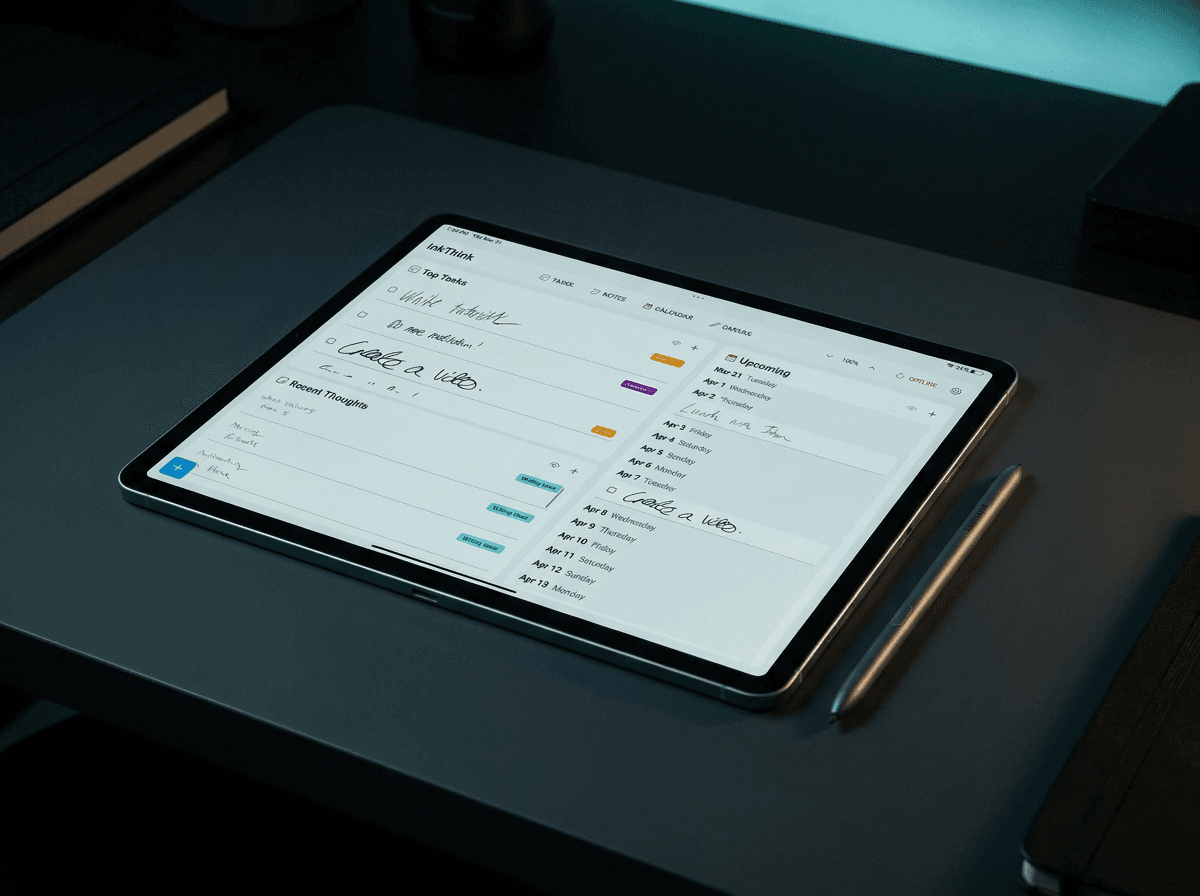
I've used this technique for years in a paper notebook. Then I switched to a stylus-first planner — InkThink on a Samsung tablet — and the same three moves Sung describes started to do something paper couldn't: they compounded. Here's how to run his method on a surface that thinks back.
Why most "thinking on paper" fails
Sung identifies three failure modes that show up the moment a "thinking on paper" habit starts to drift into a transcription habit. All three are easy to fall into, and all three are quiet — they don't feel like failure. They feel like productivity.
The first is transcribing instead of thinking. You sit in a meeting, you write down what everyone says, you walk out with a clean record of the conversation, and you've processed none of it. The page is full. The brain is empty. You went through the motions of thinking. You did not think. The page is a witness, not a participant.
The second is static paper. Write once, lose forever. The question you wrote down in March is not available to you in August when you finally have the perspective to answer it. The meeting you captured last Tuesday is not findable next Tuesday when a new problem makes it relevant again. The page is a one-shot storage medium. It has no memory.
The third is no compounding. Paper doesn't know that the meeting you had today connects to the question you wrote six months ago. You do. But you have to remember it, which is the entire thing we were trying to offload in the first place. The page does not learn from itself.
Same failure mode on Notion and the Notes apps: digital, but still static. Moving transcription from a Moleskine to a database does not make it thinking. It makes it searchable transcription.
The three moves of "thinking on paper"
Sung's video breaks his method into three principles. They're simple enough to memorize in a sentence each, and hard enough to actually do without a system.
Move 1: Write the question, not the answer
"When you're consuming dense information," Sung says, "your brain is finding it harder to hold on to all of that information." The natural response is to write it all down. That's the trap. The thing you actually need to process is not the content. It's the question that the content is making you ask. The question is the unit of thinking. The answer is just a checkpoint.
If you don't write the question down, you'll re-read the book, re-watch the video, re-ask the meeting to figure out what it was you wanted to know. If you do write the question down, you can answer it once and move on. The page holds the question so you don't have to keep re-deriving it.
Move 2: Force compression
One line. One sentence. If you can't compress it, you don't understand it yet. Sung is firm on this. The act of compressing an answer into a single line is what forces the actual processing. Transcription is infinite — there's always more to write down. Compression is finite — there's only one sentence. Finite is where the thinking happens.
A question you can't compress to one line is a question you haven't finished asking. A one-line answer you can't write is an answer you haven't actually figured out. The page is doing the forcing function for you.
Move 3: Connect it to something you already wrote
This is the move that makes the system compound. The first time you write a question, you have one isolated entry. The tenth time, you have ten. The hundredth time, if you can connect them, you have a body of thought that's smarter than any single entry. The connections are where the real thinking lives. The questions are the inputs. The connections are the outputs.
Paper can't do this for you. You have to remember to flip back through your old notes, recognize the pattern, draw the line. Most people don't. Most people's notebooks are a series of disconnected one-liners that look like a transcript of their own attention.
Where InkThink does move 3 for you
This is where the InkThink spin on Sung's method starts to earn its keep. InkThink's Intelligent Ink and Atomic Ink are reflow engines. A calendar entry isn't a static cell — it lives in day, week, month, and year views simultaneously, and when you write a question next to it, the question reflows with it.
So the connection that Sung asks you to make manually — "does this connect to something I wrote before?" — the planner surfaces it. A deadline you set in March shows up next to a note you wrote in August without you having to link them. A question you asked last quarter sits next to a calendar entry you added this week, automatically, because they share a date.
Concrete example. You write "ship the landing page" in a daily note on a Tuesday in July. InkThink reflows it onto the week view, then onto the month view, then next to the launch date in the year view. You're not re-entering the task. The task is thinking about where it lives in time. Next time you open the planner, the question and the deadline are sitting next to each other on the same screen, in three different views at once. That's the connection Sung wants you to make. The planner makes it for you.
Atomic Ink does the same thing for ideas. A thought you jotted in a daily note in January reflows into the weekly review when January becomes part of the week you're reviewing in March. The page doesn't just hold the question. It puts the question back in front of you when the context is right.
How to actually do this in InkThink
Step by step, stylus-first. This is the how-to part — Sung's three moves, run on a surface that thinks back.
1. Open a new daily page. Don't open last week's. Open today's. The point of thinking on paper is to think about what you're doing now, not to re-process what you did then.
2. Write today's single most important question at the top. Not today's to-do list. The question. "What's blocking the launch?" is a question. "Fix landing page" is a task. Tasks don't think. Questions do.
3. Write the answer in one line. Compress it. If you can't, the question is still too vague. Rewrite it. Try again. The compression is the work. A one-line answer you can't write is a one-line answer you haven't thought through yet.
4. Connect it to a calendar entry. Write the answer next to a meeting, a deadline, a date. The planner now threads the question and the answer across every view that contains that date. Day view, week view, month view, year view — same content, different scale, all visible at once.
5. Let InkThink surface the thread. Next time you open the week view, the answer is there. Next time you open the month, the question is there too. The planner is doing Sung's third move — connecting new writing to old writing — without you having to flip back through the notebook and recognize the pattern. The pattern just shows up.
The paper isn't thinking FOR you. It's thinking WITH you. Sung's method, with the structural memory a notebook can't have.
The difference this makes over a month
Run this for a month and something starts to happen that doesn't happen with paper or static notes apps. The connections pile up. A question you asked in week one is sitting next to a deadline in week four because they share a date. An answer you wrote last quarter is in the same view as a meeting you have this week, because the meeting is the natural follow-up to the answer.
You're not searching for the connection. You're being shown it. The page is doing the work Sung says you should be doing manually — except the page is faster than you are, and it doesn't forget.
This is the difference between thinking-on-paper-as-storage and thinking-on-paper-as-verb. The verb is what Sung wants. The storage is what most people do. InkThink is built for the verb.
Close — what to try today
Open InkThink. Write one question by hand today. Not a to-do. A question. Write it next to a calendar entry. Let the planner thread it across the views. Tomorrow, open the week view and notice it's there.
That's the whole method. One question. One calendar entry. Let the planner do the connecting. The third move Sung describes — the compounding move — happens automatically when the surface you're writing on has memory. Paper doesn't have memory. InkThink does.
If you want the lighter sibling for raw note capture — the question-only, no-calendar version of this — NoteDex is the same method without the date threading. Pick the one that fits the question you're trying to answer.
One-time purchase, no subscription. The page thinks back because you built it that way.
— Prem, Creator of InkThink
FAQ
What if I don't have a stylus tablet?
The three moves work on paper too. The InkThink spin adds the third move (the connecting one) automatically — on paper, you have to remember to flip back and find the connection. If you're starting on paper, just write the question, force the one-line answer, and set a calendar reminder to revisit the page in 30 days. The reminder does what InkThink's reflow does.
How is this different from a bullet journal?
Bullet journals do the first two moves — write the entry, compress it into a short form — very well. They struggle with the third move because every connection is manual. You have to flip back, recognize the pattern, draw the index entry. InkThink does the connection in the background, so the compounding happens without the bookkeeping.
Is this just Notion with a calendar?
No. Notion is a database. You can build calendar views in Notion, but the writing surface is keyboard-first. The whole point of Sung's method is that the act of writing IS the processing. Typing and writing-on-a-stylus-tablet are different cognitive acts. Notion is good for storing the output of thinking. InkThink is built for the input.
Do I have to use the daily note?
No. The method works in any view — week, month, year. The daily note is the smallest unit, which makes it the easiest place to start. Once the habit is in place, you'll write questions in whatever view you're in when the question comes up. The planner threads them all.
What if my question doesn't have an answer yet?
Write the question anyway. InkThink will reflow it across views and back to you when the context is right. The point of the question isn't to be answered today. It's to be re-asked when you have more information. Sung is explicit: the question is the unit of thinking, not the answer.
How long does the compounding take to kick in?
About a month for the first visible cross-date connection to surface. Three months for the pattern to feel automatic. The first week feels like extra work. The first month feels like a system. The third month feels like how you've always thought.
Does this work for work meetings or just personal thinking?
Both. Sung's method was developed in medical school — dense information, high-stakes retention, time pressure. It works anywhere the question-answer-compression pattern fits. For meetings, the question is usually "what did I just agree to do, and by when." The answer is the task. The deadline is the calendar entry. The planner threads all three.
Can I use this without the calendar reflow?
Yes. Write the question in a daily note without a calendar entry. You'll get move 1 (write the question) and move 2 (compress the answer). You'll do move 3 (connect it to something you wrote before) manually, like on paper. If the compounding is the part you care about, the calendar reflow is what makes it automatic.
Is InkThink a subscription?
No. One-time purchase. The app is yours, the data is yours, the questions are yours.
What's the difference between InkThink and a paper notebook?
Paper is great for move 1 and move 2. It's slow for move 3 because every connection is a manual flip-back-and-find. InkThink is built to make move 3 automatic. If you don't need the compounding, paper is fine. If you do, the reflow is the difference.