How I Run My Entire Life (Using Any Notebook)
The notebook is just a container. The container is the cheapest part. Here's the practice that runs your life in any notebook — and what changes when you put it on a tablet with Intelligent Ink.
I used to think productivity was about the tool. I bought the Leuchtturm. I bought the Hobonichi. I bought a third notebook when the second one filled up. And every time, the system fell apart within three months. Not because the notebooks were bad. Because the notebooks were never the point.
What I actually wanted — what I think most of us actually want — is a system that runs my life. A way of capturing every stray thought, every task, every meeting, every idea, and putting it somewhere it won't get lost. The notebook is just the container. The container is the cheapest part. What matters is the practice.
And the best part about a good practice? It's portable. It works in any notebook, on any device, with any pen. As long as the structure transfers, the system survives.
The Original Insight: A System, Not a Notebook
Back in 2013, a designer in Brooklyn published a method that quietly took over the productivity world. The idea was disarmingly simple: instead of buying a fancy pre-printed planner, you build your own system inside a blank dotted notebook. You use a tiny set of signifiers — a dot for a task, a circle for an event, a dash for a note — and you rapid-log every thought on the page in front of you. No formatting. No decisions. Just write.
The genius wasn't the signifiers. It was the collections. The method gave every notebook the same skeleton: an Index (your table of contents), a Future Log (your six-month horizon), a Monthly Log (one page per month), a Daily Log (one page per day), and a set of custom collections for whatever else you wanted to track — books you're reading, training plans, content calendars, project pages.
Once you have that skeleton, you stop deciding where things go. You just write them down, and migrate them forward at the start of each month. The structure externalizes the meta-work of organizing. Your brain gets to do the actual thinking.
Where Paper Breaks
The method works beautifully. For about three months.
Then the cracks start showing. Migration takes 30+ minutes per month, and most people quietly stop doing it. Lost entries are gone forever — there's no search. Your work notebook and your personal notebook can't talk to each other, so you end up maintaining two parallel systems. A 200-page notebook only holds so many collections, and when you run out of space, the whole thing collapses. People blame the notebook. They buy a new one. The system fails again.
The notebook was never the problem. The problem is that paper is static. Your ink sits exactly where you put it, and your life doesn't.
The InkThink Version: Same Practice, Reflows With You
InkThink is built on a simple bet: the practice is what makes the method work, not the paper. So we kept the practice — rapid logging, signifiers, Index, Future Log, Monthly Log, custom collections — and rebuilt the substrate.
Here's how each primitive maps:
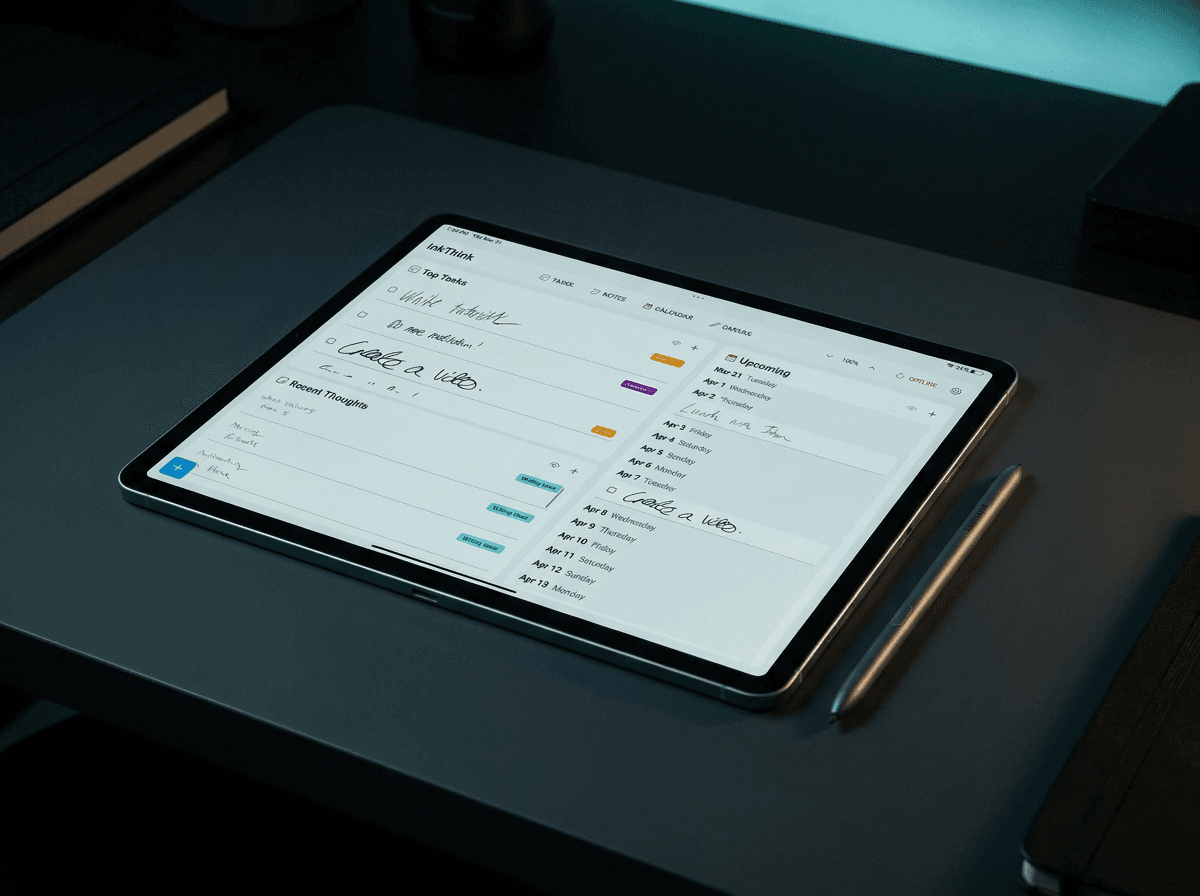
Rapid log becomes quick-ink capture. A dot, a circle, a dash — and the app knows what kind of entry it is. No menus, no formatting. Just write. Capture a task, note or event.
Index is auto-generated from your collections. It never goes stale. Add a new collection, it's in the Index. Delete one, it's gone. Zero maintenance.
Future Log is a six-month calendar canvas. Move a date, and every entry on that day reflows with it. No re-inking. No crossing out. Your future, redrawn in real time.
Monthly Log is a automatically generated because of the intelligent ink auto-reflow.
Custom collections become canvas or note with sub-note pages — one per project, one per habit, one per whatever matters to you. Each one is a freeform ink surface that lives alongside the rest of your system.
The structure transfers. The friction doesn't.
From Ritual to Muscle Memory
Paper planners reward the ritual. Sitting down on the first of the month. Migrating tasks. Drawing the next spread. There's something deeply satisfying about that — and for some people, the ritual is the practice. They want the time with their notebook. They want the slowness.
For the rest of us, the ritual is the part we secretly resent. We don't want to migrate. We want to think. We want to jot something down and trust that the system handles the rest.
That's what InkThink is for. You rapid-log 20 times a day without thinking about it. Migration happens when you open a collection. The Future Log reflows itself when a meeting moves. The Index updates itself when you add a new page. The system is invisible, and the practice is automatic. Set InkThink into Mindfulness Mode to capture your thoughts.
The best system is the one you actually use. The system that disappears is the one that wins.
How to Try It Today
You don't have to abandon your paper notebook to start. Try this:
Pick one collection you already use. A reading list, a training plan, a content calendar — anything you maintain today.
Open InkThink, create a tasks label, give it the same name. Get ready to add your tasks.
Write five entries using the • / ○ / — signifiers. Tasks, events, notes — whatever's on your mind right now and use the label.
Mark one task done. Watch it auto-migrate to your daily log without opening anything else.
That's the whole onboarding. Three minutes. No tutorials. No templates to import. Just the practice, on a substrate that doesn't break.
A Note on Pricing
InkThink is a one-time purchase. No subscription. No "Pro plan." No monthly fee that creeps up year after year. You buy it once, and you own your notebook forever — across Android, iOS, and Windows, with cloud sync included (This is a special offer if you purchase InkThink within the first week).
We think the best productivity tools are the ones you forget you're paying for. So that's how we built this one.
Frequently Asked Questions
What is the bullet journal method?
The bullet journal method is a productivity system that uses rapid logging (one line per thought, with simple signifiers for tasks, events, and notes) and a small set of standard collections (Index, Future Log, Monthly Log, Daily Log) to organize a notebook without pre-printed templates. The method's core insight is that the structure is what makes a notebook useful — the notebook itself is interchangeable.
Is there a digital bullet journal app?
Yes. InkThink is a stylus-first digital bullet journal for Android, iOS, and Windows. It preserves the rapid-logging practice and the standard collections, but stores your ink as living data — so your entries reflow across day, week, and month views without retyping or redrawing.
What is the best app for bullet journaling on a tablet?
For stylus-first users, InkThink is built specifically for the S Pen, Apple Pencil, and Surface Pen. Unlike note-taking apps that treat each page as a static image, InkThink stores your handwritten entries as data blocks that can move, reflow, and reorganize across views. It's the closest digital equivalent to the paper method's original promise.
Can I use InkThink if I've never tried bullet journaling?
Absolutely. The collections and signifiers take about ten minutes to learn. The best way to start is to pick one collection you already maintain (a to-do list, a reading log, a project tracker) and recreate it in InkThink with the • / ○ / — signifiers. The rest of the system grows from there.
Does InkThink work on Samsung Galaxy Tab with S Pen?
Yes. InkThink is built natively for Android, with full S Pen support including pressure sensitivity, palm rejection, and low-latency ink. The app is designed to feel like writing on paper — without the paper limits.
Does InkThink work on iPad with Apple Pencil?
Yes. InkThink is available on iPadOS with full Apple Pencil support, including the latest Pencil Pro features.
Does InkThink work on Microsoft Surface?
Yes. InkThink is built natively for Windows, with full Surface Pen support.
Is InkThink a subscription?
No. InkThink is a one-time purchase — you buy it once and own it across all your devices forever. No monthly fees, no annual renewals, no premium tiers.
Can I import my existing paper bullet journal into InkThink?
You can't auto-import handwritten pages (no app can read your handwriting reliably yet), but you can recreate the structure in minutes. Most users start by recreating their Index and Future Log, then progressively migrate collections as they naturally need them.
What is Intelligent Ink?
Intelligent Ink is InkThink's core technology. When you write a task, event, or note by hand, InkThink doesn't just capture it as a static image — it stores it as a modular data block with awareness of its type, date, and relationships. That's why your handwritten entries can reflow across day, week, and month views without you retyping or redrawing anything.