Are You Thinking or Just Transcribing?
If you put a screen between you and your work anyway, write with a pen on it — or you're still just transcribing. The stylus-first case for using your tablet the way a notebook wants to be used.

A few weeks ago, a piece on the NoteDex blog made a case I couldn't shake: that stopping handwriting had cost me two years of thinking. The friction of pen on paper wasn't a habit I was holding onto for nostalgia. It was doing work I couldn't do without it.
That post landed and I got the obvious messages — friends who had stopped carrying notebooks, friends who had switched to iPads and missed the way their hands used to feel at the end of a planning session. Then a stranger wrote something that stopped me: I bought an iPad thinking I'd think on it. I just type faster.
That sentence is the whole problem. If you're going to put a screen between you and your work anyway, write with a pen on it. Or you're still just transcribing.
1. The typist's tablet
I bought an iPad in 2019 and put a keyboard on it the same week. I told myself this was the upgrade — that I'd think better once the device was lighter, the battery was longer, and the search worked. What I actually did was move my email and my to-do list to a screen and call it thinking.
Five years later I have notebooks full of plans I never executed, calendars full of blocks I never kept, and a Notes app that's a graveyard of half-finished thoughts. The screen didn't change my output. The keyboard did. Once I had a typing surface that felt frictionless, I started treating every thought as something to capture, not something to think through.
This is the trap. The tablet looks like a thinking device. It isn't. It's a capture device wearing the costume of a thinking one.
2. Thinking vs transcribing (revisited)
The NoteDex piece drew a clean line between thinking and transcribing. Typing is transcription. Writing is thinking. I agree, and I don't want to relitigate the case.
What I want to add: the friction isn't the screen. It's the keyboard.
Pick up a stylus, open a planner app that's actually built for it, and write tomorrow's plan by hand on the screen. Now compare that to typing the same plan into the same app. The screen didn't change. The pen did. The pen preserves the slow-down that does the actual thinking. The keyboard removes the slow-down and gives you a clean-looking artifact that feels like thinking but isn't.
You can have both. The screen gives you the convenience of search, of reflow, of carrying one device instead of three notebooks. The stylus gives you back the friction. A tablet without a stylus is a smaller laptop. A tablet with a stylus is something else — something closer to a notebook than the tablet industry wants to admit.
3. The pen is a memory device
The NoteDex post cited the brain-imaging research: handwriting lights up motor and sensory regions that typing does not. Your hand is part of how you remember.
What the research doesn't care about is the substrate. Glass, paper, plastic — the brain activation is the same. What changes is the tool. A pen on a screen does the same thing a pen on paper does, because the bottleneck is the hand, not the page.
This is the part that surprised me when I switched back to a stylus. I had assumed the screen was the problem. It wasn't. The keyboard was the problem. As soon as I started writing by hand on the iPad instead of typing into it, the planning sessions started feeling like planning sessions again. The same motor regions were firing. The same sensory feedback was happening. The screen was invisible to the part of me that was doing the work.
If you've written by hand for any length of time, you know this feeling. The hand is a memory device. The screen doesn't break it. The keyboard does.
4. Atomic Ink: what pen-on-paper couldn't do
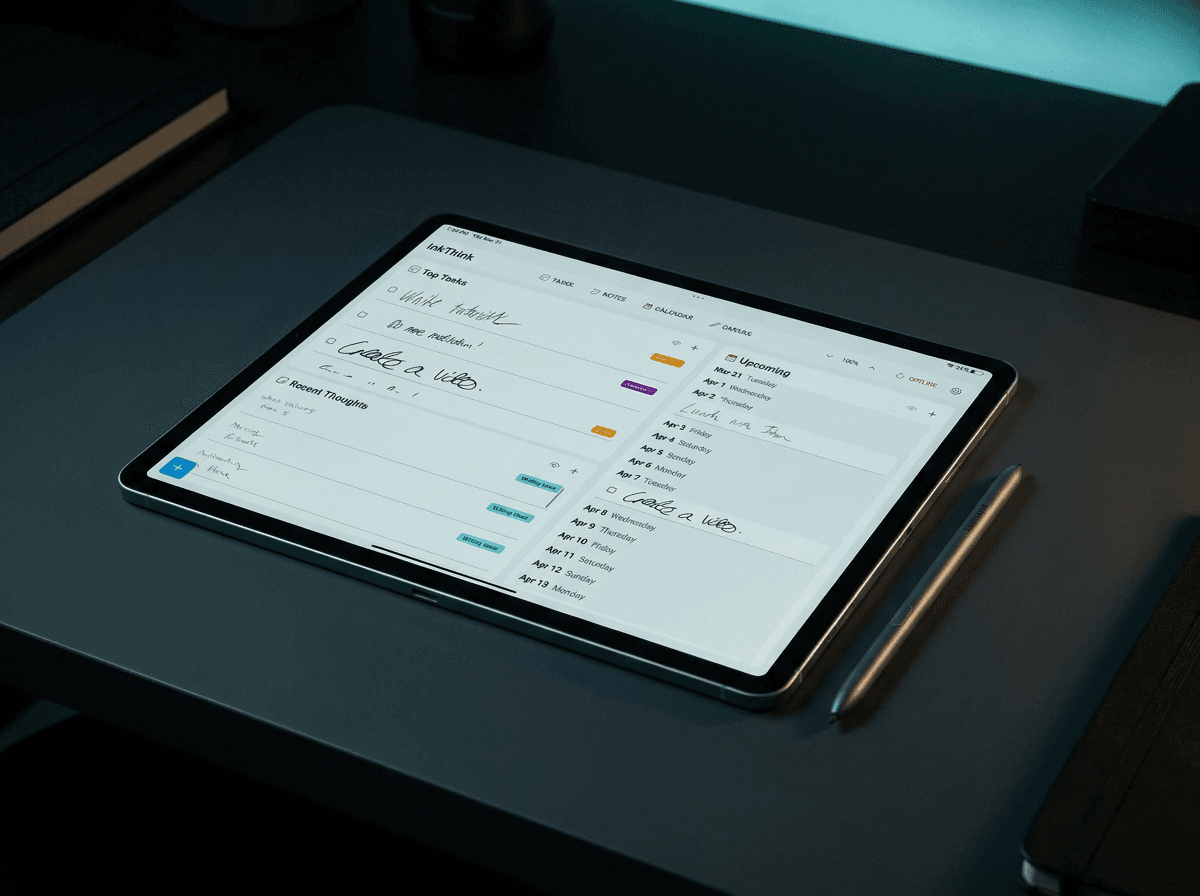
Here's where InkThink earns its place. A paper notebook has a real constraint: once you've written a calendar entry, it lives where you wrote it. Move the meeting to Thursday, the entry still says Wednesday. Cross it out, write a new one, the page looks like a graveyard by Friday.
Atomic Ink does something paper physically can't. You write a calendar entry by hand — the pen is doing the thinking work — and the ink reflows across the daily, weekly, and monthly views. Change the meeting, the ink changes with it. The hand did the work. The system kept itself current.
This is the part that used to be a contradiction. Paper has the friction. Digital has the structure. Apps that fight the pen — that try to be smart about handwriting recognition, that auto-format your scrawl into a typed bullet list — they kill the friction and call it a feature. InkThink keeps the friction. The pen does what the pen does. The system does what systems do. Neither one pretends to be the other.
It's a small thing. It's also the thing that makes a digital planner usable for people who actually think by writing.
5. The honest interface, reimagined
A keyboard is a permissive surface. Type anything, the screen accepts it. There's no resistance to bad ideas, no second-pass required, no visual record of the hesitation you had before sending the message.
A pen is an honest surface. Cross-outs stay. Scrawls look scrawled. If you wrote it down thinking one thing and then changed your mind, the page shows you changed your mind. That's not a flaw. That's the interface telling the truth.
Stylus-on-glass inherits the pen's honesty. The cross-out you make is the cross-out that stays. The hesitation you had is the hesitation the page records. The tablet wants you to keep moving — swipe, tap, autocomplete, send — and the stylus sits you down.
InkThink's Atomic Ink isn't a feature list. It's the interface choosing to behave more like a notebook and less like a feed. The page is where the second between writing and looking lives. A screen that respects that second is doing something most apps aren't willing to do.
6. Protocol: one task, by hand
Like the NoteDex post, this ends with a small ask, not a big one.
Open InkThink. Write one task by hand today. Not the whole list. One task. Write it the way you'd write it in a notebook — slowly enough that you notice what you're committing to.
Tomorrow: write the first step of that task by hand. Same screen, same pen.
The week after: write the day, not the list. Plan the morning before you plan the afternoon. Plan the thinking before you plan the doing.
If you've been treating your tablet like a smaller laptop, this is the smallest possible test that you don't have to. The friction does the thinking. The screen carries the work. You get to keep both.
— Prem, Creator of InkThink